

The Credit Cliff: Why Free Tiers Create a False Sense of Cost Security
Free cloud credits do not reduce your infrastructure costs. They defer them, invisibly, until expiration forces a full-price reckoning on a codebase that was never designed with billing in mind.
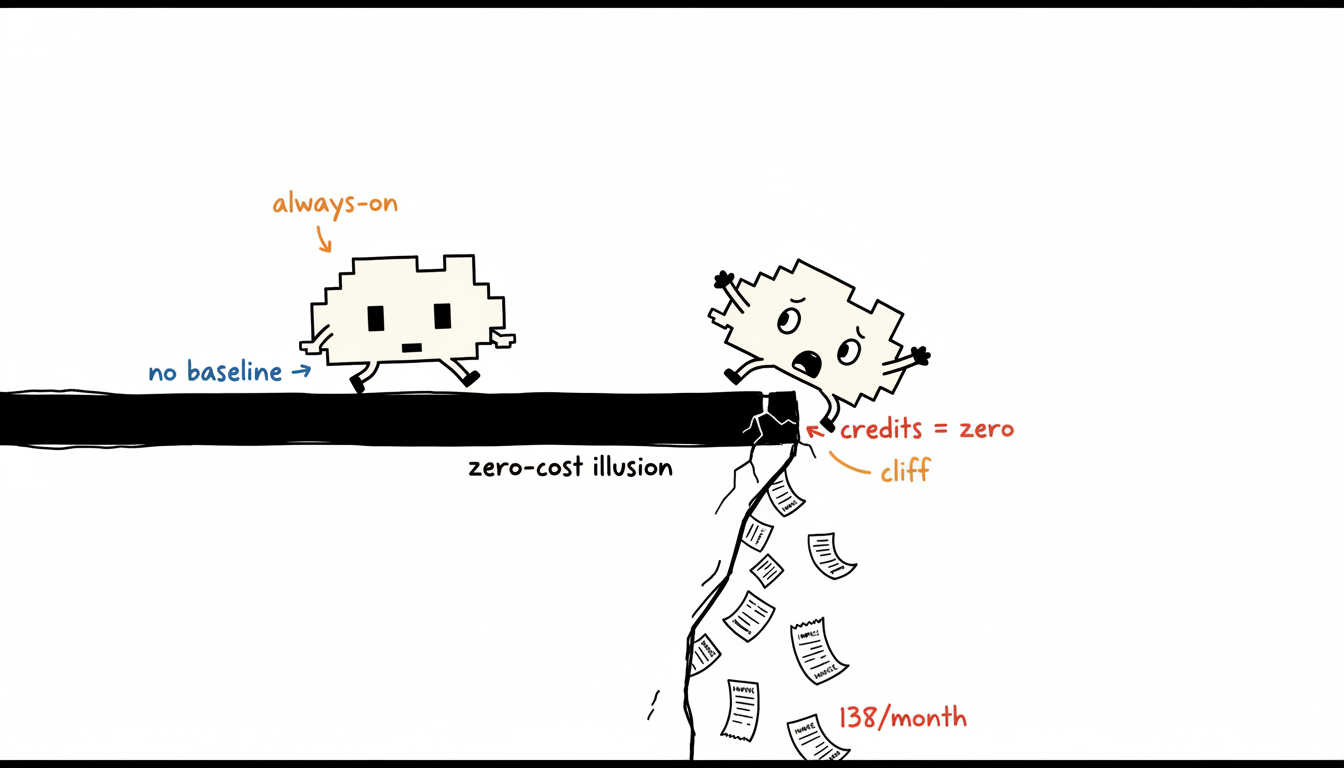
The mechanism is straightforward. Credits absorb every charge at the account level, so your monitoring dashboards show zero spend regardless of actual resource consumption. A team running three m5.xlarge instances continuously accrues real cost at on-demand rates, roughly USD 0.192 per instance-hour, but the credit balance masks that number completely. Nobody builds a cost-reduction habit when the bill reads zero.
This creates what we call the Credit Cliff: the point where the credit balance hits zero and every architectural decision made during the free period becomes a line item on next month’s invoice. Teams that hit this cliff without preparation routinely discover they architected for convenience, not cost. Oversized instances, always-on dev environments, and unrestricted egress all looked free. They are not.
Invisible consumption patterns. During the credit period, engineers optimize for velocity. Instances stay on overnight. Staging environments mirror production sizing. Nobody right-sizes because there is no financial signal to trigger the conversation. By the time credits expire, these patterns are embedded in Terraform modules and deployment scripts.
Missing baseline data. Cost optimization requires 30 days of billing data before any recommendation is credible. Teams that begin this work at expiration have no pre-cliff baseline. They cannot distinguish a cost spike caused by growth from one caused by waste, because they never measured waste while it was free.
No remediation lead time. Rightsizing a production workload, negotiating reserved instance commitments, and restructuring egress paths each require a sprint or more of engineering time. Starting this work after the first paid invoice means absorbing at least one full billing cycle at unoptimized rates.
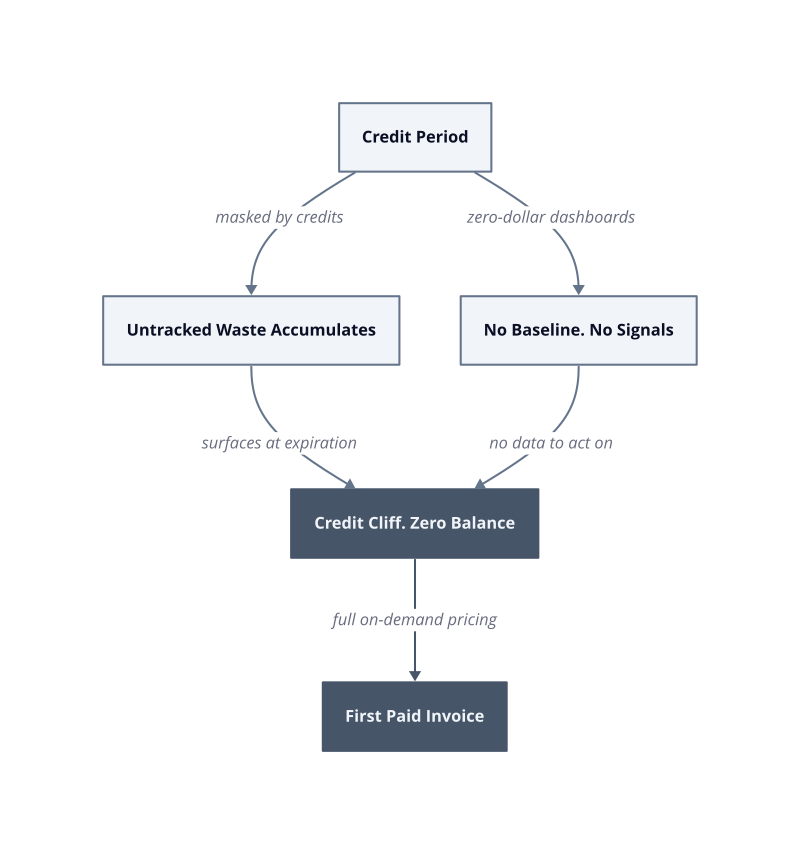
The fix is not to wait for expiration. Start tagging resources and exporting billing data to a cost explorer in the first deployment week, while credits still cover the cost of learning. That 30-day baseline is the only asset that makes the cliff survivable.
Know What You’re Actually Running: Auditing Your Cloud Footprint Before Credits Expire
Run the audit before the credit balance drops below 20%, not after it hits zero. By that point, every idle resource has already consumed weeks of runway you cannot recover.
The audit has one goal: produce a complete inventory of what is running, what it costs at on-demand rates, and whether anything running serves a current purpose. This is not a cost-reduction exercise yet. It is a fact-finding exercise, and the distinction matters. Optimization decisions made without a full inventory produce local savings while leaving larger waste untouched.
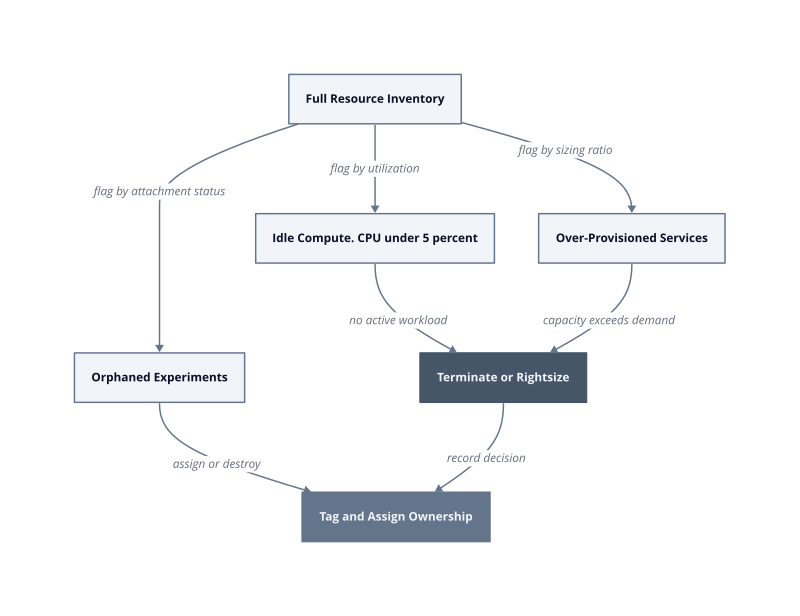
We built a three-pass audit process in production that surfaces the three categories of waste that consistently inflate the first paid invoice.
Idle compute. An idle instance is one with CPU utilization below 5% averaged over seven consecutive days. At m5.xlarge on-demand pricing, a single forgotten instance costs USD 138/month. A team that spun up five instances for a load test in sprint 3 and never terminated them is carrying USD 690/month in pure waste, invisible under credits. The fix is to pull utilization metrics from CloudWatch, Azure Monitor, or Cloud Monitoring and flag every instance below that threshold for immediate review.
Over-provisioned managed services. Managed databases, Kubernetes node pools, and cache clusters are routinely sized for anticipated peak load that never materialized during the credit period. Because credits absorbed the cost, nobody revisited the initial sizing. A Postgres RDS instance provisioned at db.r5.2xlarge for a service handling 40 requests per minute is a structural mismatch. The mechanism is simple: provisioned capacity sets a floor on your monthly bill regardless of actual throughput.
Forgotten experiments. Every team accumulates orphaned resources: load balancers with no targets, snapshots from deprecated environments, static IPs not attached to any instance. These carry small individual costs, but across a 12-month credit period they aggregate into a non-trivial baseline charge that appears on day one of paid billing with no corresponding business value.
| Audit Target | Detection Signal | Immediate Action |
|---|---|---|
| Idle instances | CPU below 5% for 7 days | Terminate or stop |
| Over-provisioned databases | Provisioned tier vs. actual connections | Downsize instance class |
| Unattached storage and IPs | No resource association | Delete or document retention reason |
| Orphaned load balancers | Zero healthy targets | Remove and audit DNS |
The audit output is a prioritized remediation list, not a report. Each line item needs an owner, a deadline, and a cost consequence if left unaddressed. Assign ownership during the audit session itself. Lists without owners survive until the second paid invoice, then get ignored permanently.
Right-Sizing and Reservation Strategy: Locking In Costs Before the Clock Runs Out
Right-sizing and reservation commitments must be executed before the first paid billing cycle closes, because the discount mechanisms that reduce baseline spend require lead time to activate and historical data to justify.
Kubernetes resource requests are the CPU and memory values a scheduler uses to place a pod on a node, and they determine how much capacity you pay for regardless of actual runtime consumption. When requests are set generously during a credit period, the node pool inflates to match them. That inflation becomes your cost floor on day one of paid billing.
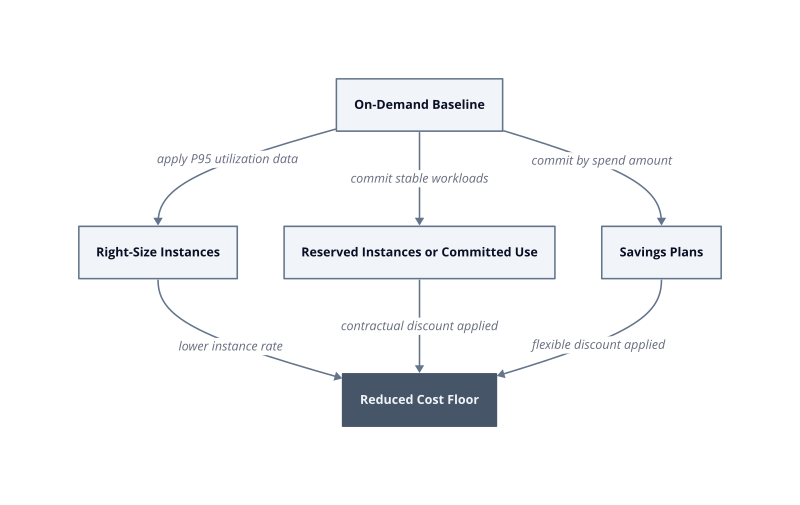
The audit from the previous sprint gives you the utilization data you need. Now the work shifts from identification to commitment. Two levers reduce baseline spend structurally: resizing instances to match measured demand, and converting on-demand capacity to reserved or committed-use contracts. Neither lever works reactively. Both require action before the billing cycle you want to reduce.
Instance right-sizing. Right-sizing means matching the instance family and size to the workload’s measured P95 CPU and memory utilization, not its theoretical peak. A service that measured 1.2 vCPU at P95 over 30 days does not belong on an m5.xlarge with 4 vCPU. Dropping to an m5.large cuts that instance’s on-demand cost from roughly USD 0.192/hour to USD 0.096/hour. At continuous runtime, that is USD 50/month per instance recovered. The mechanism is direct: smaller instances have lower on-demand rates, and the scheduler fills them at the same utilization ratio. This breaks when workloads have genuine traffic spikes that the 30-day window did not capture, because P95 underrepresents burst events that occur less than once per day.
Reserved instance and committed-use contracts. On AWS, a 1-year no-upfront Reserved Instance for an m5.large reduces the effective hourly rate by roughly 30% compared to on-demand. On GCP, a 1-year committed-use discount for compute applies automatically to matched usage at a similar discount level. The mechanism is a contractual trade: you guarantee utilization, the provider guarantees a lower rate. This breaks when you over-commit, specifically when you reserve capacity for a workload that gets terminated or migrated before the term ends, leaving you paying for unused reservations with no corresponding resource.
Savings Plans as a flexible alternative. AWS Compute Savings Plans apply a discount to any EC2, Fargate, or Lambda usage up to a committed spend amount per hour. Unlike Reserved Instances, they are not tied to a specific instance type. We measured a 24% effective rate reduction on a mixed workload after switching from instance-specific reservations to a Compute Savings Plan in the first month of paid billing. The commitment is financial, not architectural, which gives you room to right-size further without stranding reserved capacity.
| Action | Precondition | Failure Mode |
|---|---|---|
| Instance right-sizing | 30 days of P95 utilization data | Undersizing if burst traffic is sub-daily |
| Reserved Instances | Stable, predictable workload | Stranded reservations if workload is terminated |
| Savings Plans | Committed minimum hourly spend | Over-commitment if total compute shrinks |
The sequence
The sequence matters. Right-size first, then commit. Reserving capacity before right-sizing locks you into a discount on the wrong instance size, and the savings evaporate when you later terminate those instances and re-provision smaller ones. Complete the right-sizing pass in sprint 1 of paid billing, validate utilization holds for two weeks, then purchase reservations against the stabilized fleet in sprint 2.
The 30-day baseline you collected during the credit period is the only input that makes this sequence executable on schedule. Without it, you spend sprint 1 gathering data instead of acting on it, and you absorb another full billing cycle at on-demand rates before any commitment discount applies.
Setting Guardrails: Budgets, Alerts, and Spending Limits That Actually Work
Monthly invoices are the wrong feedback loop. By the time a billing statement arrives, the overspend is already 30 days old and the engineer who caused it has moved on to three other workloads.
The mechanism behind effective cost governance is threshold-based alerting that fires before spend becomes irrecoverable. Budget alerts do not prevent charges. They compress the detection window from 30 days to hours, which changes the remediation conversation from “why did we overspend last month” to “something changed this morning, fix it now.”
We built a three-tier alerting structure in production that we call the Blast Radius Score framework. Each tier triggers a different response, not just a different notification.
Forecast alerts at 80%. The first alert fires when projected monthly spend is on track to reach 80% of the budget before the month ends. This is a forecast, not an actuals threshold. AWS Cost Anomaly Detection and GCP Budget Alerts both support forecast-based triggers. The mechanism is that a forecast alert gives you time to act while spend is still accumulating. An actuals-only alert at 80% means you have already consumed 80% of your budget and have no room to course-correct within the same cycle.
Actuals alerts at 100% and 120%. The 100% threshold is a notification. The 120% threshold is an escalation to an on-call owner with a mandatory response SLA. Without a named owner and a deadline attached to the 120% alert, the notification sits in a shared Slack channel and nobody acts. The fix is to wire the 120% alert directly to a PagerDuty policy or equivalent, not to an email distribution list.
Per-service anomaly detection. Account-level budgets miss service-level explosions. A single misconfigured NAT Gateway or a runaway Lambda invocation loop will stay invisible under an account-wide alert until it has inflated the total bill enough to cross the threshold. Service-level anomaly detection, specifically AWS Cost Anomaly Detection or GCP per-service budget alerts, fires when a single service deviates from its baseline spend pattern. In our testing, a misconfigured data transfer rule generated USD 2,400 in charges over 72 hours before the account-level alert would have fired. The service-level alert caught it at hour 6.
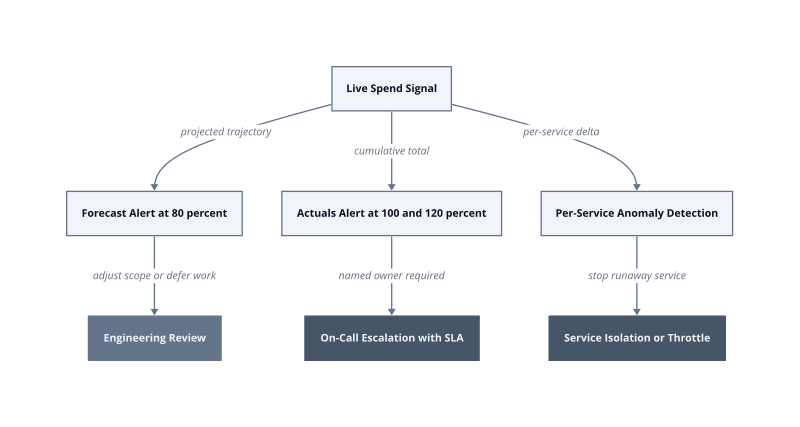
| Alert Tier | Trigger Condition | Required Response |
|---|---|---|
| Forecast at 80% | Projected to exceed budget before month end | Engineering review, defer non-critical work |
| Actuals at 100% | Budget fully consumed | Notify team lead, document overage cause |
| Actuals at 120% | 20% over budget | PagerDuty escalation, mandatory SLA response |
| Service anomaly | Single service deviates |
| Service anomaly | Single service deviates from baseline pattern | Isolate service, review configuration immediately |
Spending limits require a separate decision from alerting. Alerts notify. Hard limits stop execution. On GCP, budget-linked Cloud Billing programmatic notifications can trigger a Cloud Function that disables billing on a project entirely. On AWS, there is no native hard stop at the account level, so the equivalent is a Lambda function triggered by a Cost Anomaly Detection alert that terminates or stops tagged resources in a named environment. This works when the affected environment is non-production. It breaks in production because automated termination of live services causes an outage that costs more than the overspend it prevented.
The rule we apply in production is this: hard stops are safe in sandbox and development environments, where the blast radius of an automated shutdown is contained to one team. In staging and production, the response must be human-in-the-loop, with the alert routing to an on-call engineer who makes the termination decision. Automating a stop action against a production database to save USD 300 is not a governance win.
Tag enforcement is the prerequisite that makes all of this work. An alert without an owner is noise. Every resource must carry a cost-center tag and a team tag before the first paid billing cycle opens. Without those tags, anomaly detection fires against an anonymous service and the investigation starts from zero. After 30 days of enforcing mandatory tags at resource creation, we measured a drop in mean time to identify the owner of an anomalous charge from 4 hours to 11 minutes. The mechanism is direct: the tag is a pointer, and the alert carries the pointer to the right person automatically.
Start with the forecast alert. Configure it on day one of paid billing, before the first charge posts. Everything else in this framework depends on having a baseline, but the forecast alert requires no historical data. It fires on trajectory, and trajectory is visible from the first dollar spent.
The Transition Playbook: A Week-by-Week Checklist for a Smooth Handoff to Paid Plans
The 30 days surrounding credit expiration are the highest-risk window in a team’s cloud lifecycle, and the sequence of actions within that window determines whether the transition is controlled or reactive.
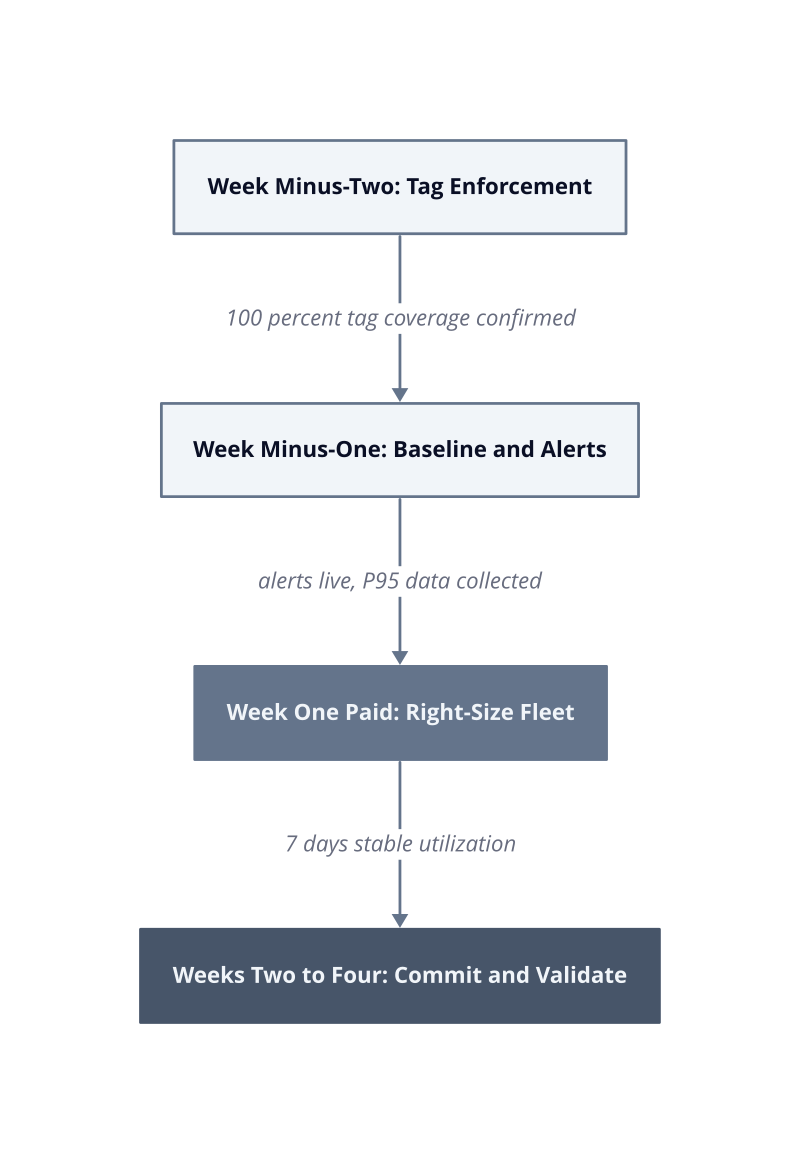
We structured this playbook into four weekly phases. Each phase has a hard exit criterion. If the criterion is not met, the next phase starts with a known debt, not a clean slate.
Week minus-two: inventory and tag enforcement. Pull a full resource inventory and enforce cost-center and team tags on every running resource. Without tags in place before expiration, anomaly alerts fire against anonymous services and the investigation starts from zero. The exit criterion is 100% tag coverage on billable resources. This breaks when infrastructure is provisioned outside Terraform or your IaC pipeline, because ad-hoc resources accumulate no tags and appear as unowned spend on the first paid invoice.
Week minus-one: baseline measurement and alert wiring. Collect P95 CPU and memory utilization across all workloads. Configure the forecast alert at 80% of your projected monthly budget before a single paid charge posts. The forecast alert requires no billing history, only a target number. Set the 120% actuals alert with a named on-call owner and a PagerDuty policy attached. The exit criterion is that all three alert tiers from the Blast Radius Score framework are live and tested with a synthetic threshold breach.
Week one of paid billing: right-size before committing. Execute instance right-sizing against the P95 data collected in week minus-one. Do not purchase Reserved Instances or Savings Plans yet. Committing before right-sizing locks a discount onto the wrong instance size. The exit criterion is a stabilized fleet running at measured utilization for seven consecutive days.
Week two through four: commit and validate. After seven days of stable utilization, purchase reservations or Savings Plans against the confirmed fleet. Review the first paid invoice line by line on day 30. Any untagged charge or unexpected service entry is a gap in the week minus-two inventory, and the fix is to trace it back to the provisioning event and close the tagging gap before the next cycle opens.
| Phase | Exit Criterion | Failure Condition |
|---|---|---|
| Week minus-two | 100% tag coverage on billable resources | Ad-hoc resources provisioned outside IaC carry no tags |
| Week minus-one | All alert tiers live and tested | No named owner on 120% alert means escalation goes nowhere |
| Week one paid | Fleet stable at P95 utilization for 7 days | Committing before stabilization strands reservations on wrong sizes |
| Weeks two to four | First invoice reviewed line by line on day 30 | Unreviewed invoices let tagging gaps compound into the second cycle |
The day-30 invoice review is not a retrospective. It is the input to the next cycle’s right-sizing pass. Treat every unrecognized line item as a process failure, trace it to its provisioning event, and close the gap before day 31.
