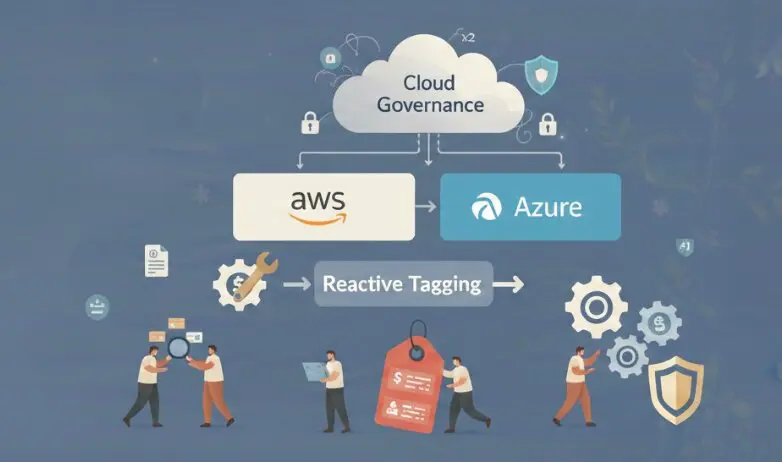

Manual tagging strategies have a consistent failure mode: they work at the start and break down within six months. Engineers forget tags when creating resources through the console. Terraform modules get written without a tags block. An EC2 instance gets snapshotted and restored without its tags. By the time a FinOps review runs, 23% of cloud spend is unattributable because the resources generating it have no cost allocation tags.
The solution is not a tagging reminder in Slack. It is enforcement at the point of creation and automated remediation for everything that already exists. This post covers how to build that on AWS and Azure specifically.
Why Manual Tagging Always Drifts
Manual tagging fails through three consistent paths.
The first is console creation. Engineers spinning up a test instance at 11pm to debug a production issue are not thinking about the team, environment, and cost-center tag requirements. They create the resource, fix the issue, and move on. The resource stays.
The second is IaC gaps. A Terraform module written six months ago does not have the project tag that the FinOps team added to the tagging standard last quarter. Every resource created from that module is missing the tag. No one notices until the cost allocation report.
The third is resource propagation. An EC2 AMI gets copied to a new region. An RDS snapshot gets restored to a new instance. Neither the AMI copy nor the restored instance inherits the tags from the source. Each new resource starts untagged.

The reactive approach is to run a weekly scan, identify untagged resources, and chase down engineers to tag them. This works for the first two weeks. Then the backlog grows faster than the tagging rate. Teams that implement preventive enforcement reduce untagged resource percentage to under 3% within 90 days. Teams that stay reactive stabilize at 20-30%. The same pattern applies to zombie cloud resources: without attribution tags, you cannot identify who owns an idle resource or who to notify when it needs to be cleaned up.
AWS Auto-Tagging: What Tag Policies Actually Do (And Don’t Do)
The most common misunderstanding in AWS tag governance: Tag Policies enforce tag key casing and allowed values, but they do not apply missing tags. A Tag Policy that says the Environment key must have values prod, staging, or dev will flag a resource where Environment=production as non-compliant. It will not flag a resource where Environment is absent entirely, and it will not add the tag automatically.
Tag Policies are a compliance reporting tool, not an auto-tagging tool. They matter, but they are not the mechanism that solves tag drift.
| Mechanism | What It Does | What It Misses |
|---|---|---|
| AWS Tag Policies | Enforces casing and allowed values | Does not apply missing tags |
| AWS Config required-tags rule | Detects resources missing specified tag keys | Does not apply tags, requires separate remediation |
| EventBridge + Lambda | Applies tags within seconds of resource creation | Only catches resources created after the rule is set up |
| Config + SSM Automation | Remediates existing untagged resources | Async, not real-time; runbook must be authored per resource type |
The real auto-tagging architecture on AWS uses EventBridge to intercept resource creation events from CloudTrail and trigger a Lambda function that applies default tags immediately.
The Lambda function reads the event to identify who created the resource (from the userIdentity field in the CloudTrail event), which account it is in, and which region. It then applies a default tag set based on those signals: the account maps to a team, the region maps to an environment, and the creator’s IAM role maps to a cost center.
For existing untagged resources, AWS Config with the required-tags managed rule detects compliance violations and can trigger an SSM Automation document to apply default tags. This is slower (minutes to hours, not seconds) but covers the backlog.
Azure Auto-Tagging: The Modify Effect Is the Answer
Azure Policy’s Modify effect is the most underused native governance feature in Azure. Most teams know Audit (log non-compliance) and Deny (block non-compliant resources). Far fewer use Modify, which actually writes tag values to resources at creation time without any external Lambda or Automation Account.
A Modify policy assignment with a managed identity that has the Tag Contributor role at the subscription scope will automatically apply specified tags to every new resource created in that subscription. The policy evaluates at resource creation, and if the tag is missing or has a non-compliant value, it writes the correct value before returning the creation response.

| Azure Policy Effect | Auto-Tags at Creation | Remediates Existing | Blocks Non-Compliant |
|---|---|---|---|
| Audit | No | No | No |
| Deny | No | No | Yes |
| Modify | Yes | Yes (via remediation task) | No |
| DeployIfNotExists | No | Yes (deploys child resource) | No |
For tag inheritance from resource groups and subscriptions, DeployIfNotExists is the right effect. It deploys an inline policy that copies specified tags from the parent scope (subscription or resource group) down to child resources. The effect runs at resource creation and can be triggered on-demand via a remediation task to backfill existing resources.
One critical setup requirement: the policy assignment’s managed identity needs explicit role assignment. Without Contributor or Tag Contributor at the assignment scope, Modify and DeployIfNotExists effects silently fail to write tags. This is the most common reason Azure auto-tagging policies appear to be configured but produce no results.
Tag Inheritance: Propagating From Account to Resource
Both clouds have inheritance gaps that require explicit configuration.
On AWS, tag propagation is opt-in per service. EC2 instances do not inherit tags from their launch template by default — you must enable PropagateTagsFromLaunchTemplate in the launch template configuration. RDS instances do not inherit tags from their DB subnet group or parameter group. Auto Scaling groups have a PropagateAtLaunch flag per tag that must be set to true for each tag individually.

| AWS Resource Type | Tag Propagation Support | Configuration Required |
|---|---|---|
| EC2 from Launch Template | Yes | PropagateTagsFromLaunchTemplate: true |
| EC2 from Auto Scaling Group | Yes, per tag | PropagateAtLaunch: true on each tag |
| RDS instance | No from subnet/param group | EventBridge Lambda required |
| ECS task | Yes from task definition | propagateTags: TASK_DEFINITION |
| Lambda function | No | Tagged at creation only |
On Azure, resource group tags do not propagate to child resources without a DeployIfNotExists policy. A resource group tagged environment=prod contains resources with no environment tag unless a policy is actively writing that tag to new resources. The inheritance feels implicit but is not.
What Native Tooling Misses
Native auto-tagging covers resources created directly via API or IaC. It consistently misses four categories.
Managed service child resources are the largest gap. When RDS creates storage volumes, those volumes are AWS resources with their own ARNs but they are created by the RDS service, not by your account’s API call. EventBridge does not capture the creation event from your CloudTrail. The volumes are untagged by default. Same for ECS task ENIs, ALB target group attachments, and Lambda execution role policies.
Third-party tool creation is the second gap. Resources created by SaaS tools, marketplace products, or vendor automation that uses their own IAM roles bypass your EventBridge rules. The creator identity in CloudTrail is the vendor’s role, not your team’s.
Cross-account resources are the third. A resource created by an account that does not have your EventBridge rule or Azure Policy assignment deployed will not be tagged. Governance must be deployed consistently across all accounts and subscriptions, not just the primary ones.
Tag drift after initial application is the fourth. A tag applied at creation can be removed or overwritten later. A terraform apply that removes a tag block will delete the tag from the resource. Continuous monitoring — not just creation-time enforcement — is required to catch this.
| Creation Method | EventBridge Lambda | Azure Policy Modify | Coverage |
|---|---|---|---|
| Console / CLI | Yes | Yes | Full |
| Terraform / IaC | Yes | Yes | Full |
| Managed service child resource | No | No | Gap |
| Third-party tool | Partial (by identity) | Partial | Partial |
| Resource restore / clone | Partial | Partial | Partial |
| Post-creation tag removal | No | No | Gap |
From Tag Policy to Tag Governance
Auto-tagging is not a project you complete. It is a continuous enforcement loop: detect untagged resources, apply default tags, verify coverage, report the metric, and close gaps when new resource types or creation paths appear.

The coverage metric is what operationalizes this. Tracking the percentage of resources with all required tags by account and service type gives you a lagging indicator of where enforcement is breaking down. A drop from 97% to 91% coverage in the us-east-1 EC2 service after a deployment window means a new creation path is not covered by the tagging rule.
This is exactly the kind of continuous tag governance at scale that prevents the 23% unattributable spend problem from recurring after you fix it. ZopNight monitors tag coverage continuously across AWS and Azure, triggers remediation when coverage drops, and surfaces the coverage percentage as a governance metric alongside cost and environment health. Tag governance is not separate from cost control. It is the prerequisite for cost control to work at all.
Organizations with under 3% untagged resources can allocate 97% of their cloud spend to teams, projects, and environments. That level of attribution is what makes cloud cost accountability a real engineering practice rather than a finance exercise.