# Kubernetes Requests vs Limits: Pin Memory, Stop Capping CPU
> Most teams get limits wrong because they treat Kubernetes requests vs limits as one dial. The scheduler reads the request once, at placement. The kernel enforces the limit for as long as the…
Source: https://zop.dev/resources/blogs/kubernetes-requests-vs-limits-how-to-set-them-without-throttling-or-oomkills
Published: 2026-11-05 · Author: muskan-bandta · Tags: kubernetes, aws, azure, sre, database
---
Most teams get limits wrong because they treat Kubernetes requests vs limits as one dial. The scheduler reads the request once, at placement. The kernel enforces the limit for as long as the container runs, on every 100ms CFS period.
The fix is a rule we call Pin-and-Float. Pin memory: set the memory request equal to the memory limit. Float CPU: give latency-sensitive services an accurate CPU request and no CPU limit. This works when requests come from measured usage, and it breaks when requests are guesses, because a floating workload then borrows capacity the node never reserved for it.
**TL;DR**
- CPU limits throttle a container inside each 100ms CFS period, even on a node with idle CPU.
- [Memory limits](https://zop.dev/resources/blogs/oomkill-is-the-next-lie-why-memory-limits-are-hiding-your-latency-spikes) never slow a container down. They end it with an OOM kill, exit code 137.
- Pin memory request to limit, float CPU on a measured request, and measure with VPA in Off mode first.
## Requests Decide Placement, Limits Decide Survival
The kube-scheduler uses a container's resource request to decide which node to place the Pod on. After placement, the CPU request keeps one job: it sets the container's share of CPU when the node is contended. The limit is a separate control, enforced by the kernel for the whole life of the container.
A limit without a request is not a pod without a request. If a container sets only a limit, and no admission default applies, Kubernetes copies the limit and uses it as the request. A container with only a 100m CPU limit is scheduled as if it asked for 100m.
| Setting | Read by | When | What happens when exceeded |
|---|---|---|---|
| CPU request | kube-scheduler, then kernel CPU shares | Placement, then under contention | Nothing, idle CPU is free to use |
| CPU limit | Kernel CFS bandwidth control | Every 100ms period | Threads throttled until the next period |
| Memory request | kube-scheduler, then kubelet eviction | Placement, then node pressure | Pod becomes an eviction candidate |
| Memory limit | Kernel OOM killer | Under memory pressure | Container killed, exit code 137 |
Unit suffixes cause a quieter failure. A CPU quantity of 0.1 equals 100m, and Kubernetes rejects any CPU precision finer than 1m. Memory suffixes are case sensitive: 400m of memory is a request for 0.4 bytes, not 400Mi.
## CPU Limits Throttle Pods on Nodes With Idle CPU
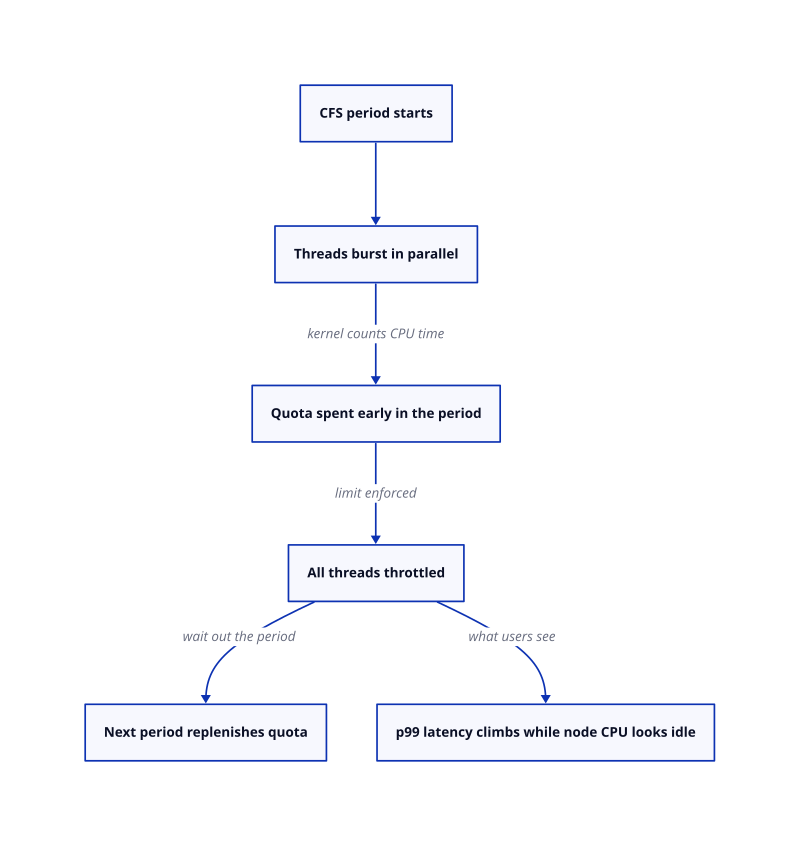
The kernel enforces a CPU limit through CFS bandwidth control. Each cgroup gets a quota of CPU time in each period, and the default period is 100ms. Once the quota is used, its threads are throttled and cannot run again until the next period replenishes it.
This explains why a node with idle CPU still throttles a container. The limit applies per container and per period, not per node. A request handler that fans out across threads can spend a whole period's quota early, then sit parked for the rest of it.
Burst credit does not rescue it by default. The kernel setting `cpu.cfs_burst_us` defaults to 0, so a container cannot bank quiet periods and spend them on a spike.
Older kernels made the problem worse. Kernel commit de53fd7aedb1 fixed threaded, non-CPU-bound applications being throttled while not using their quota. It landed in v5.4 and was backported to the 4.14 and 4.19 stable branches. Check the node kernel before you blame the application.
Throttling hides from average CPU graphs, so measure it directly. cAdvisor exposes `container_cpu_cfs_periods_total` and `container_cpu_cfs_throttled_periods_total` as counters. Divide the rate of throttled periods by the rate of total periods to get the [throttling ratio per container](https://zop.dev/resources/blogs/detect-fix-cpu-throttling-kubernetes). One community guide suggests alerting when that ratio stays above 25% over a 5-minute window.
The deeper trap is that [CFS throttling misleads dashboards](https://zop.dev/resources/blogs/cpu-throttling-is-lying-to-you-why-your-container-limits-bleed-latency) built on averages. Average CPU over a minute can sit well under the limit while throttling still fires inside individual periods. The ratio catches it. The average never will.
## Memory Limits Kill Containers, They Never Slow Them Down
Memory has no throttle. The kernel enforces a memory limit reactively, with an OOM kill, and only once it detects memory pressure. A container can sit above its limit for a while and then die without a warning.
The evidence lives in the pod status. A container killed this way shows Last State Terminated, Reason OOMKilled, Exit Code 137 in `kubectl describe pod`. Exit code 137 on its own is weaker evidence than it looks: it means 128 plus signal 9, SIGKILL. Only the OOMKilled reason proves the [memory limit did it](https://zop.dev/resources/blogs/oomkill-memory-limits-hiding-latency-kubernetes).
Node pressure adds a second way to die. The default hard eviction threshold on Linux nodes is `memory.available<100Mi`. When node resources are exhausted, Kubernetes evicts BestEffort pods first, then Burstable, then Guaranteed. Only pods exceeding their requests are candidates for eviction.
The kernel OOM killer follows the same order. The kubelet sets `oom_score_adj` to -997 for Guaranteed pods and 1000 for BestEffort pods. A Guaranteed pod is the last container the kernel picks.
Memory is the resource where the limit and the request should match. A pod whose memory request equals its limit can never exceed its request, so it stays out of the eviction pool that pressure empties first.
## Pin-and-Float: Pin Memory to Its Limit, Float CPU on Its Request
The rule has two halves, and each half follows from how the kernel enforces that resource. CPU over a limit degrades slowly. Memory over a limit fails at once. Opposite failures call for opposite limit policies.
**Pin memory.** Set the memory request equal to the memory limit, sized from observed peak usage after warmup. Overruns then surface as a clean OOMKilled at a known ceiling, not as a surprise eviction. This works when you size from post-warmup peaks. It breaks for workloads with unbounded caches, because a fixed ceiling turns cache growth into a restart loop.
**Float CPU.** Set an accurate CPU request and remove the CPU limit on latency-sensitive services. The request still reserves the container's share when the node is contended, so neighbours cannot starve it. Without a limit there is no quota, and without a quota there is no CFS throttling. This works on nodes where every pod carries an honest request. It breaks when a batch job runs with an inflated or missing request, because its CPU appetite becomes contention for everyone else.
Stop capping CPU on services that answer users, and stop letting memory float above its request.
**When to keep a CPU limit.** Keep one for untrusted tenants, shared multi-tenant namespaces and batch jobs on shared nodes. There, a predictable ceiling is worth some throttling. Guaranteed QoS also needs it: every container must have CPU and memory requests equal to their limits.
| Workload | Memory | CPU | QoS class | Breaks when |
|---|---|---|---|---|
| Latency-sensitive API | Request equals limit | Request only, no limit | Burstable | CPU requests are guessed, not measured |
| Batch job on shared nodes | Request equals limit | Request and limit | Burstable | The limit sits below steady usage |
| CPU-pinned workload | Request equals limit | Request equals limit, whole cores | Guaranteed | Any container in the pod is left unpinned |
| Untrusted tenant | Request equals limit | Request and limit | Burstable or Guaranteed | Namespace quotas are missing |
## Measure Before You Pin: VPA in Off Mode, Then Resize in Place
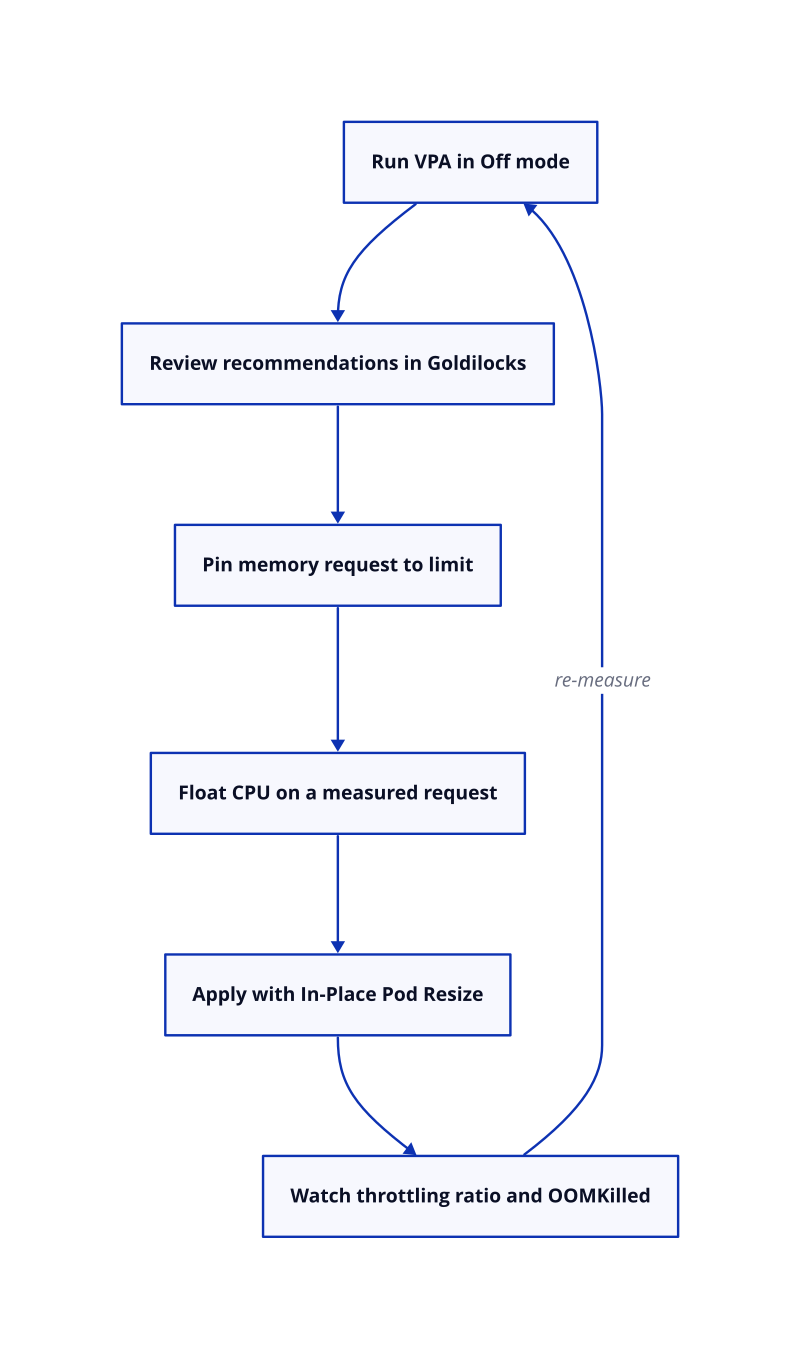
Pin-and-Float only works with honest numbers, and honest numbers come from measurement. The Vertical Pod Autoscaler produces them. In Off mode it computes recommendations and changes nothing, so it is safe to run on every workload first.
Goldilocks packages that pattern. It creates a VPA for each workload in a namespace, queries those VPAs for recommendations and shows them in a dashboard. Treat it as an audit, not an autopilot. The output feeds a [rightsizing measurement loop](https://zop.dev/resources/blogs/rightsizing-control-loop), not a one-off change.
Applying the numbers is where restarts used to bite. Recreate, the default VPA mode, evicts pods whose requests drift from the recommendation, within their Pod Disruption Budgets. The updater's `--min-replicas` flag defaults to 2, so it leaves single-replica workloads alone. Auto is deprecated and behaves like Recreate.
In-Place Pod Resize changes that trade. It was alpha in Kubernetes 1.27, beta in 1.33, and is stable in 1.35. CPU and memory requests and limits become mutable on a running Pod, often without a container restart. VPA's InPlaceOrRecreate mode uses it, and that mode has graduated to beta.
## Next Steps Start With Two Signals, Not a Config Change
The throttling ratio and the OOMKilled reason tell you which half of the rule each workload breaks. Act on them in this order:
- Chart throttled periods over total periods for every latency-sensitive container.
- Search pod status for Reason OOMKilled, not just exit code 137.
- Run VPA in Off mode and review the recommendations before changing a single request.
- Pin memory, float CPU, and let measured requests carry the weight that limits used to carry.