# The Hidden Cost Trap in Managed Kubernetes Pricing
> Comparing managed Kubernetes costs on control plane fees alone produces budgets that collapse within the first billing cycle. The control plane line item is visible, predictable, and almost…
Source: https://zop.dev/resources/blogs/eks-vs-gke-vs-aks-control-plane-and-node-cost-for-the-same-workload
Published: 2026-11-20 · Author: riya-mittal · Tags: kubernetes, aws, gcp, azure
---
## The Hidden Cost Trap in Managed Kubernetes Pricing
Comparing managed Kubernetes costs on control plane fees alone produces budgets that collapse within the first billing cycle. The control plane line item is visible, predictable, and almost irrelevant to total spend. What actually drives overruns is the compounding interaction between per-resource billing models, SLA tier fees, and network [egress charges](https://zop.dev/resources/blogs/the-egress-bill-nobody-attributed-60k-hiding-in-untagged-transfers) that no single pricing page documents together.
The trap is structural. [Amazon EKS Pricing](https://aws.amazon.com/eks/pricing/) shows a flat $0.10 per cluster per hour for standard Kubernetes version support. That figure reads as small until you run three small clusters with one to three nodes each: the control plane fee then represents a material fraction of total compute spend because the denominator is tiny. The fee does not scale with workload size, so small clusters pay the same overhead as large ones.
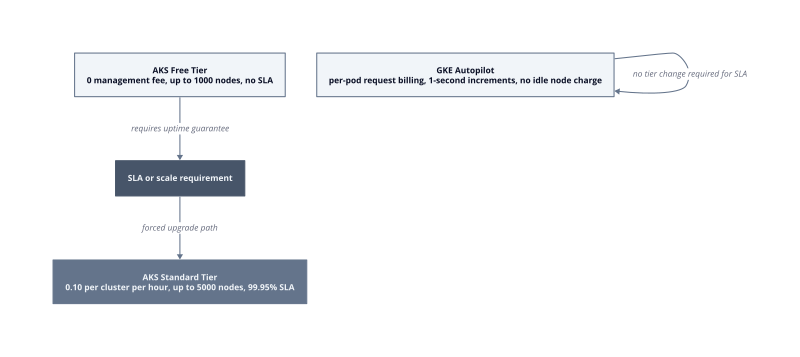
**Control plane SLA tiers.** AKS starts from a free baseline but requires the Standard pricing tier for any enterprise SLA guarantee, adding $0.10 per hour on top of node VM costs. That matches EKS pricing numerically but the architecture is different: teams migrating from AKS free tier to Standard for a production SLA discover the increase mid-sprint, not during planning.
**Pod-level billing mechanics.** [GKE Pricing](https://cloud.google.com/kubernetes-engine/pricing) shows Autopilot charges in one-second increments for CPU, memory, and ephemeral storage that running pods request, with no minimum duration. The mechanism is that idle capacity never accumulates charges because there is no provisioned node sitting empty. Teams running bursty or batch workloads benefit specifically from this model; teams running latency-sensitive workloads with over-provisioned requests pay for every requested byte even when utilization is low.
**Ingress cost multiplication.** Multi Cluster Gateway and Multi Cluster Ingress add $3 per backend Pod per month (730 hours), approximately $0.0041096 per backend Pod per hour, billed in 5-minute increments ([GKE Pricing](https://cloud.google.com/kubernetes-engine/pricing)). This cost is invisible in control plane comparisons and absent from most benchmark methodologies.
**Egress and storage gaps.** No official pricing page publishes a standardized total-cost-of-ownership figure that includes network egress, [NAT gateway](https://zop.dev/resources/blogs/do-vpcs-cost-money-aws-vpc-pricing-explained), load balancer, and persistent disk costs across EKS, GKE, and AKS for identical workloads. These charges differ materially by provider and compound at scale, which means any benchmark that stops at VM pricing is measuring roughly half the actual bill.
The correct framing is not "which provider is cheapest" but "which billing model matches our workload shape." A team that answers that question after 30 days of production traffic data makes a defensible architectural decision. A team that answers it from a pricing calculator screenshot makes a future incident postmortem.
| Metric | Value |
|--------|-------|
| EKS control plane fee | USD 0.10 per cluster per hour |
| GKE Multi Cluster Ingress per backend pod | USD 3.00 per month |
| GKE Autopilot billing increment | 1 second |
| GKE Autopilot regional SLA | 99.95% |
## EKS Pricing: What the $0.10 and $0.60 Per Hour Actually Mean
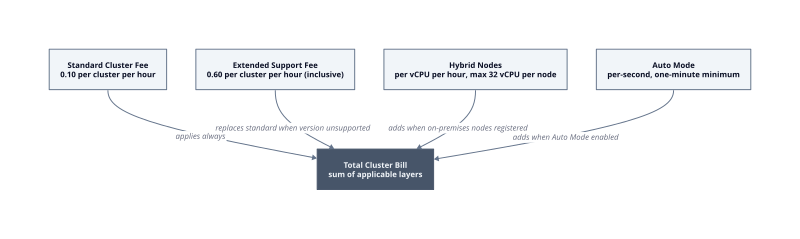
The $0.10 per cluster per hour advertised by [Amazon EKS Pricing](https://aws.amazon.com/eks/pricing/) is not the ceiling. It is the floor, and three separate billing mechanisms stack on top of it before your first workload runs.
**Extended support surcharge.** EKS charges $0.60 per cluster per hour for any cluster running a Kubernetes version under extended support. That rate is inclusive of the standard $0.10, meaning the extended support penalty alone adds $0.50 per cluster per hour. The mechanism is that AWS prices version longevity as a managed service, not as a free grace period. Teams that defer upgrades to avoid application risk pay for that deferral directly on the compute bill.
**Hybrid Nodes vCPU cap.** EKS Hybrid Nodes bill per vCPU per hour, with each node capped at 32 vCPUs regardless of the node's actual vCPU count. For nodes with fewer than 32 vCPUs, the cap is irrelevant. For bare-metal or high-core-count on-premises hardware, the cap creates a billing ceiling, not a penalty. The important point is that the charge is independent of utilization: a hybrid node sitting idle at 5% CPU still bills for every vCPU up to that 32-vCPU maximum. Teams placing large on-premises hosts into a hybrid cluster need to model idle-time cost explicitly.
**Auto Mode per-second billing.** EKS Auto Mode charges per second with a one-minute minimum, independent of the EC2 instance purchase option. That independence matters because it means a Reserved Instance or Savings Plan discount on the underlying EC2 compute does not eliminate the Auto Mode surcharge. The two billing streams run in parallel. A workload that provisions and terminates nodes rapidly accumulates Auto Mode charges that do not appear in EC2 cost explorer line items, making attribution harder without a dedicated cost allocation tag strategy.
The layers are additive, not mutually exclusive. A cluster using Auto Mode, registering hybrid nodes, and running on an unsupported Kubernetes version accumulates all three surcharges simultaneously. None of that complexity appears in a headline rate comparison.
| Metric | Value |
|--------|-------|
| Standard control plane fee | USD 0.10 per cluster per hour |
| Extended support control plane fee | USD 0.60 per cluster per hour |
| Hybrid Nodes vCPU billing cap | 32 vCPUs per node |
| Auto Mode billing minimum | 60 seconds |
After the first billing cycle with extended support active, audit the version skew across every cluster. A single cluster sitting two minor versions behind adds $0.50 per hour that an upgrade sprint eliminates permanently.
## GKE and AKS: Free Tiers, Autopilot Billing, and Tier Upgrade Surprises
GKE and AKS both undercut EKS on idle costs for small clusters, but through different mechanisms, and the gap collapses the moment a team upgrades AKS to a tier with an uptime guarantee.
The structural difference starts at zero. The [AKS Free and Standard Pricing Tiers](https://learn.microsoft.com/en-us/azure/aks/free-standard-pricing-tiers) page confirms that the AKS Free tier carries no charge for cluster management: teams pay only for the VMs, disks, and network resources their workloads consume. For teams running small pre-production or development clusters, the control plane cost is literally absent from the invoice.
GKE Autopilot removes idle node costs through a different mechanism. Kubernetes resource requests are the declared CPU, memory, and ephemeral storage values a pod reserves at scheduling time, and [GKE Autopilot Overview](https://cloud.google.com/kubernetes-engine/docs/concepts/autopilot-overview) charges against those requests in one-second increments rather than against provisioned VM capacity. Because there is no underlying node sitting allocated between workload bursts, an idle cluster accumulates no compute charges. The fix for wasted capacity is architectural: eliminate the node abstraction entirely.
**The tier upgrade trap.** AKS Free tier provides no financially backed uptime SLA. The moment a team needs production reliability, specifically the 99.95% Kubernetes API server availability that Standard tier delivers when [availability zones](https://zop.dev/resources/blogs/vpc-peering-pricing-on-aws-azure-and-gcp) are configured, they cross into a tier that adds $0.10 per hour for cluster management. That figure matches EKS control plane pricing numerically, but the psychological impact differs because teams started from zero. The increase appears mid-sprint, not in a planning document, because the trigger is an operational requirement rather than a scheduled budget event.
**Autopilot's over-provisioning penalty.** GKE Autopilot charges for every CPU and memory unit a pod requests, regardless of actual utilization. A team that migrates over-provisioned workloads from node-based clusters to Autopilot without tuning requests pays for headroom they never use. The model rewards precise resource declarations and breaks when teams carry the padding they needed to avoid OOM kills on shared nodes.
Teams that model their initial AKS costs at the Free tier and then grow into Standard discover that every cluster in their fleet begins billing the management fee simultaneously. A fleet of ten clusters transitions from zero control plane spend to a meaningfully higher hourly rate in a single tier change, with no per-cluster granularity to defer.
| Metric | Value |
|--------|-------|
| AKS Free tier management fee | USD 0.00 per cluster per hour |
| AKS Standard tier management fee | USD 0.10 per cluster per hour |
| AKS Free tier node ceiling | 1,[000 nodes](https://zop.dev/resources/blogs/cluster-autoscaler-vs-karpenter-at-10-000-nodes-what-the-benchmarks-miss) |
| AKS Standard tier node ceiling | 5,000 nodes |
| AKS Standard API server availability (with availability zones) | 99.95% |
The decision point is not "GKE Autopilot versus AKS Free." It is "what happens after 30 days when the first production incident raises an SLA requirement." Teams that answer that question before cluster creation pick a tier with predictable costs. Teams that defer it absorb a fleet-wide fee increase on the day they can least afford the distraction.
## The Costs Pricing Pages Don't Show: Egress, Load Balancers, and System Overhead
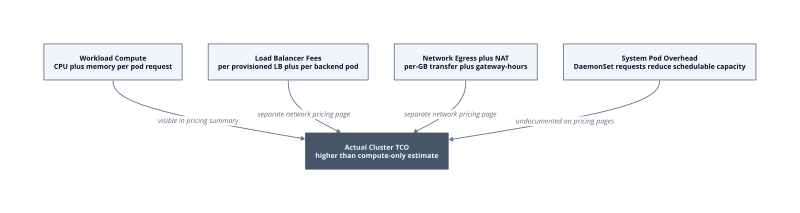
Raw compute and control plane fees are only part of the invoice. Network egress, load balancer charges, and system pod overhead accumulate independently of workload compute, and benchmarks that exclude them systematically understate total cluster cost.
The mechanism is straightforward: each provider meters data leaving its network, provisions L4 or L7 infrastructure per service, and schedules a fixed set of system pods onto every cluster regardless of whether a team's workload needs them. None of these line items appear on the pricing page summary tables. All three compound as clusters grow.
**Network egress and NAT gateways.** Traffic leaving a cloud provider's network is billed per gigabyte transferred. The rate differs by destination, by region pair, and by whether traffic exits through a managed NAT gateway or directly from a node. NAT gateways add a processing charge on top of the egress rate, so a cluster funneling external traffic through a managed NAT pays twice: once for the data volume and once for the gateway-hours. A service receiving inbound requests from the internet and responding with large payloads accumulates egress charges that are invisible in CPU and memory cost models. Because [Amazon EKS Pricing](https://aws.amazon.com/eks/pricing/) and [GKE Pricing](https://cloud.google.com/kubernetes-engine/pricing) both defer egress details to their respective network pricing pages, teams pulling cluster cost estimates from Kubernetes-specific pages miss this category entirely.
**Load balancer fees per service.** Every `type: LoadBalancer` service provisions a cloud load balancer. The charge is per provisioned instance, not [per request](https://zop.dev/resources/blogs/mcp-server-protocol-negotiation-and-discovery), so an idle load balancer fronting a staging environment bills at the same hourly rate as one serving production traffic. GKE's Multi Cluster Gateway and Multi Cluster Ingress carry an additional layer: [GKE Pricing](https://cloud.google.com/kubernetes-engine/pricing) lists a charge of $3 per backend pod per month (730 hours), which is $0.0041096 per backend pod per hour, billed in 5-minute increments. A multi-cluster deployment with 50 backend pods accumulates $150 per month in gateway fees before a single byte of data moves. Teams migrating from single-cluster to multi-cluster architectures without auditing backend pod counts discover this charge mid-billing cycle.
**System pod overhead.** Every managed Kubernetes offering provisions DaemonSets and system pods by default. These pods request CPU and memory at scheduling time, reducing the capacity available for workload pods without appearing in application-layer cost attribution. On GKE Autopilot, the effect is direct: the billing model charges for pod resource requests in one-second increments, so system pods with non-trivial requests generate compute charges that belong to the provider's operational overhead, not the team's workload. The exact resource footprint differs by provider and cluster configuration, and no official pricing page documents it in standardized terms. The practical fix is to measure system pod requests on a live cluster after the first deployment week, then subtract that baseline from available node capacity before sizing workload resource limits.
| Cost Category | Billing Trigger | Pricing Page Visibility |
|---|---|---|
| Control plane fee | Per cluster per hour | Explicit |
| Load balancer (standard) | Per provisioned instance per hour | Separate network page |
| Multi Cluster Gateway (GKE) | USD 3.00 per backend pod per month | GKE pricing page, subsection |
| Network egress | Per GB transferred out | Separate network page |
| NAT gateway | Per gateway-hour plus per-GB processing | Separate network page |
| System pod requests | Per pod request (Autopilot) or implicit capacity loss (node pools) | Not documented |
The GKE multi-cluster gateway charge is the most specific and the most frequently missed. A team that counts 50 backend pods at $3 per pod per month hits $150 monthly in gateway fees alone. Add egress at scale and an unaudited NAT gateway, and the gap between a compute-only estimate and the actual invoice reaches a size that invalidates the original provider selection model. Run `kubectl top pods -n kube-system` on a live cluster and total the resource requests before writing the capacity plan.
## Reserved and Committed-Use Discounts: Why Cross-Platform Comparisons Break Down
Discount structures for reserved capacity differ so fundamentally across EKS, GKE, and AKS that a savings estimate calculated on one platform produces the wrong number when applied to another, even for identical instance families and term lengths.
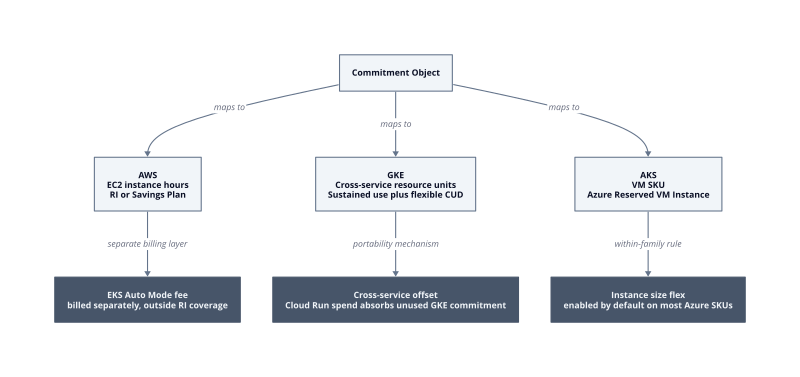
The root cause is that each provider attaches commitment discounts to a different billing object. AWS Reserved Instances and Savings Plans apply to EC2 instance hours. GKE workloads running on Compute Engine can receive [sustained use discounts](https://cloud.google.com/compute/vm-instance-pricing) automatically, up to 30% net for VMs that run a full billing month, triggered at 25% monthly utilization with no upfront commitment. Azure Reserved VM Instances apply to the underlying virtual machine SKU, independent of AKS cluster configuration. When a team benchmarks three platforms using a single discount percentage, they are comparing instruments that measure different things.
GKE's flexible committed use discounts introduce a further wrinkle. A single flexible commitment covers eligible spend across Compute Engine, GKE, and Cloud Run simultaneously, as confirmed by [Google Compute Engine VM Pricing](https://cloud.google.com/compute/vm-instance-pricing). That portability benefits teams with mixed workloads, because unutilized commitment in one service offsets charges in another. It breaks the comparison model because the effective discount rate depends on total cross-service consumption, not GKE spend alone. A team that runs Cloud Run alongside GKE achieves a higher effective discount than a team running GKE exclusively at the same committed spend level.
The **EKS Auto Mode billing layer** compounds this. [Amazon EKS Pricing](https://aws.amazon.com/eks/pricing/) specifies that EKS Auto Mode charges are billed per second with a one-minute minimum, independent of the EC2 instance purchase option. A Reserved Instance covering the underlying EC2 node reduces that line item, but the Auto Mode charge itself sits outside the RI coverage boundary. Teams modeling EKS savings against a Reserved Instance rate without accounting for the separate Auto Mode fee overestimate their actual discount.
**Sustained use discounts require no action, but reward stability.** GKE's sustained use mechanism activates automatically when a VM runs more than 25% of a billing month. The discount scales incrementally, reaching 30% for full-month utilization. Workloads with irregular schedules, specifically batch jobs that run intensively for a few days then stop, never accumulate enough runtime to reach the full discount tier. Sustained use discounts apply to resources used for more than 25% of a billing month, so a team running jobs at a monthly utilization below that threshold receives no discount at all.
**Reserved Instance portability rules differ by platform.** AWS Convertible Reserved Instances allow instance family changes within the term; Standard Reserved Instances do not. Azure Reserved VM Instances support instance size flexibility within the same family by default on most SKUs. GKE committed use discounts apply at the resource-unit level rather than to specific machine types. Each flexibility model rewards a different workload pattern, and the wrong choice locks capital into a commitment that does not reduce the actual workload's charges.
**Spot and preemptible pricing is not a substitute for RI analysis.** GKE Spot VMs offer up to 91% off on-demand pricing, but that discount is conditional on interruption tolerance and carries no capacity guarantee. Reserved and committed-use discounts apply to stable, predictable workloads where availability cannot be sacrificed. Treating spot discounts as evidence that GKE is cheaper than EKS on committed spend conflates two distinct purchasing instruments with different risk profiles.
| Platform | Discount Instrument | Billing Object | Auto-Applied | Cross-Service Portable |
|---|---|---|---|---|
| EKS | Reserved Instance or Savings Plan | EC2 instance hours | No | Savings Plans: partial |
| GKE | Sustained use discount | Per-VM monthly runtime | Yes, at 25% threshold | No |
| GKE | Flexible committed use | Resource units (vCPU, RAM) | No, requires purchase | Yes, across Compute, GKE, Cloud Run |
| AKS | Azure Reserved VM Instance | VM SKU | No | No, per-SKU family |
The only reliable comparison method is to build a workload-specific model
The only reliable comparison method is to build a workload-specific model that inputs actual monthly runtime hours, instance family, and cross-service spend mix for each platform separately. A team running steady-state compute on GKE for the full billing month can receive up to a 30% net discount automatically through sustained use discounts. The same team on EKS pays on-demand rates unless they purchase a Reserved Instance or Savings Plan in advance, and still pays the per-second Auto Mode fee on top of whatever EC2 commitment they hold. The numbers diverge before a single line of optimization work begins.
Pricing pages document ceiling discounts under ideal conditions. Billing exports show the effective rate your workload actually achieved, which is the only figure that belongs in a provider cost comparison.
## How to Build a Total Cost of Ownership Comparison That Actually Holds Up
A valid TCO comparison requires a structured cost model built from live billing data, not a side-by-side of pricing page summaries. The gap between a pricing page estimate and an actual invoice exists because control plane fees, pod-level charges, and support lifecycle surcharges each follow different billing clocks that only converge in the final invoice.
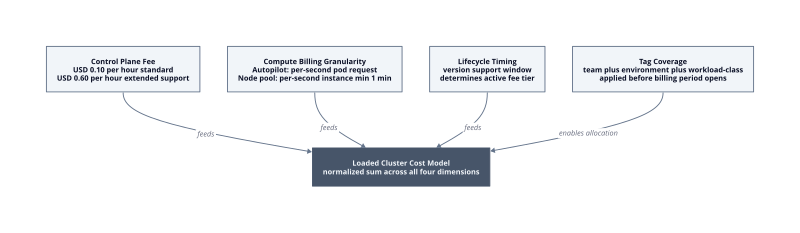
The framework has a name worth using consistently: the **Loaded Cluster Cost Model**. It separates cluster spend into four independently measured dimensions, then sums them after normalization. Skipping any dimension produces a number that will be wrong in a direction that biases the comparison toward whichever provider hides that dimension best.
**Control plane fees, stated and unstated.** The base control plane charge for EKS is $0.10 per cluster per hour ([Amazon EKS Pricing](https://aws.amazon.com/eks/pricing/)). That rate doubles to $0.60 per cluster per hour the moment a cluster falls under extended support, because the extended support fee is inclusive of the standard fee, not additive on top of it. A team planning a migration window that extends past the standard support cutoff must price the destination cluster's version lifecycle, not just its current rate. AKS provides a free tier with no control plane fee, but the Standard tier adds $0.10 per hour at the point an enterprise SLA is required, matching EKS standard pricing from a higher baseline.
**Pod-level versus node-level billing granularity.** GKE Autopilot charges in one-second increments for CPU, memory, and ephemeral storage that running pods request, with no minimum duration ([GKE Pricing](https://cloud.google.com/kubernetes-engine/pricing)). GKE Standard node pools use per-second billing on the underlying Compute Engine instance with a one-minute minimum. EKS charges for the EC2 instance regardless of pod packing efficiency. The practical effect: a cluster running intermittent jobs on Autopilot pays only for the seconds those pods are active, while a node pool on EKS or GKE Standard bills for the full provisioned instance. After 30 days of data, compare actual pod-active seconds against node-provisioned seconds to quantify this gap for your specific workload pattern.
**Support lifecycle timing as a cost multiplier.** Kubernetes version support windows determine when a cluster transitions from standard to extended support pricing. On EKS, that transition is the trigger for the $0.60 per cluster per hour rate. The fix is to treat version upgrade cadence as a financial control, not a maintenance task. Clusters on current versions pay $0.10 per hour; clusters left behind pay six times that rate.
**Workload-class tagging before cost allocation.** Raw billing data assigns charges to resources. It does not assign charges to business units or workload classes without a consistent tag schema applied before the billing period closes. A TCO comparison between providers is meaningless if one provider's billing export contains tagged workloads and the other does not. Apply a minimum tag set, specifically `team`, `environment`, and `workload-class`, to every node group and namespace before starting the measurement period. By sprint 3 of a migration, untagged resources should be treated as a build-breaking condition, not a cleanup ticket.
| Model Dimension | EKS Input | GKE Autopilot Input | AKS Standard Input |
|---|---|---|---|
| Control plane fee | USD 0.10/hr standard, USD 0.60/hr extended | Free for Autopilot clusters | USD 0.10/hr Standard tier |
| Compute billing unit | EC2 instance-hour | Pod resource request, per-second | VM instance-hour |
| Minimum billing duration | Varies by EC2 purchase type | None | Per-second, 1-minute minimum |
| Version lifecycle risk | Extended support at 6x control plane rate | Per-channel release schedule | Separate LTS channel available |
This model breaks when tag coverage falls below 100% of cluster resources, because the allocation step produces a denominator that excludes real spend. It also breaks when version upgrade timelines are set by an engineering team without input from finance, because the extended support rate on EKS activates on a fixed calendar date, not on a team's sprint schedule. Build the version expiry dates into the same tracking system that holds your reserved capacity commitments, and review both together at the start of each quarter.