# Cloud Rightsizing Without Breaking Production: gp2 to gp3, EC2 CPU Baselines and GPU Instances (G5, G6, P4, P5)
> Cloud rightsizing closes the gap between provisioned capacity and actual workload demand, recovering idle spend without degrading performance. Infrastructure sized for theoretical peak loads…
Source: https://zop.dev/resources/blogs/cloud-rightsizing-without-breaking-production-gp2-to-gp3-ec2-cpu-baselines-and-g
Published: 2026-10-27 · Author: bableen-kaur · Tags: kubernetes, aws, azure, cloudgovernance, sre
---
## Quick Answer (TL;DR)
Cloud rightsizing closes the gap between provisioned capacity and actual workload demand, recovering idle spend without degrading performance. Infrastructure sized for theoretical peak loads accumulates chronic over-provisioning because actual peaks rarely match projections. The highest-leverage targets are storage volume migrations (gp2 to gp3) and GPU compute families, where cost-to-performance ratios are most favorable. Native provider tools like AWS Compute Optimizer surface recommendations, but teams consistently augment them with third-party platforms to enforce remediation at scale.
## Why this happens
The root cause is a structural mismatch between provisioning decisions and operational feedback loops. Capacity is committed at project inception, when demand is speculative. Engineers size for worst-case scenarios because the cost of under-provisioning, a degraded user experience or a missed SLA, is visible and immediate. The cost of over-provisioning is diffuse and deferred, buried in a monthly invoice rather than a [production incident](https://zop.dev/resources/blogs/why-your-on-call-engineer-is-the-last-line-of-defense-against-a-50k-incident). Because no feedback mechanism connects runtime utilization back to the provisioning decision, the original estimate fossilizes. Workloads evolve, traffic patterns shift, and the infrastructure sits frozen at its initial scale. This is not carelessness. It is a rational response to asymmetric incentives: the engineer who causes an outage is accountable; the engineer who wastes $2,400 per idle node [per month](https://zop.dev/resources/blogs/the-shadow-compute-bill-28k-month-nobody-approved) at m5.xlarge on-demand pricing faces no equivalent consequence. After 30 days of production data, the divergence between provisioned and consumed capacity becomes measurable, but without a governance process that routes that signal back to an owner, the waste compounds silently across every subsequent billing cycle.
## Fix #1: most common
The single most impactful remediation in EBS cost governance is migrating gp2 volumes to gp3, and AWS performs this migration live with zero downtime.
The mechanism that makes gp2 expensive is its coupling between IOPS and capacity. On gp2, performance scales at 3 IOPS per GB of provisioned size, so teams overprovision storage purely to reach an IOPS floor their application needs. A volume provisioned at 1 TB to unlock 3,000 IOPS, when the workload only consumes 200 GB, pays for 800 GB of idle storage with no recovery path inside the gp2 model. gp3 decouples these: baseline IOPS are fixed at 3,000 regardless of volume size, and additional IOPS are provisioned independently. The stranded storage cost disappears.
The subcommand that executes this is `modify-volume`. Issue it against the target volume, specifying the destination type. AWS sets the `ModificationState` field to `modifying` immediately and progresses it through `optimizing` to `completed` while the volume stays fully attached and serving I/O. No snapshot, no detach, no maintenance window.
| Phase | ModificationState value | Volume accessible |
|---|---|---|
| Change submitted | modifying | Yes |
| Background optimization in progress | optimizing | Yes |
| Migration complete | completed | Yes |
**The field that matters.** `ModificationState` is the only reliable signal that a modification finished. [Teams who](https://zop.dev/resources/blogs/terraform-vs-opentofu-after-12-months-what-actually-migrated) poll `VolumeType` alone see `gp3` before optimization completes, then schedule a second operation against a volume still mid-flight. That collision produces throttled I/O. Poll `ModificationState` until it reads `completed` before treating the volume as stable.
**The trap most guides omit.** Migrating to gp3 at the default baseline yields no throughput gain if the workload was relying on gp2 burst credits. gp2 volumes under 1 TB accumulate burst credits that deliver up to 3,000 IOPS in short bursts. After migration, burst credit behavior disappears entirely. If the workload's peak I/O pattern relied on that burst bucket rather than sustained throughput, the first production spike after migration will surface a latency regression. Audit CloudWatch's `BurstBalance` metric for each target volume in the week before migration. A volume that regularly drains its burst balance needs explicit IOPS provisioning set on the `modify-volume` call, not just a type change.
## Fix #2: alternative
The alternative path to EBS cost recovery is volume deletion, not migration, and it recovers more money per action than any type conversion.
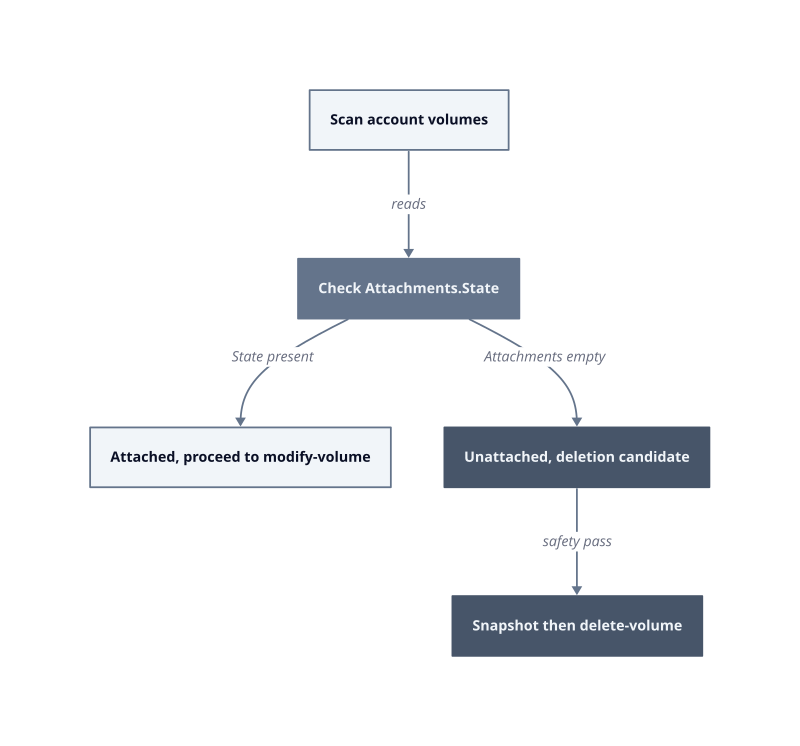
Before that previous fix can apply, every `modify-volume` candidate needs to pass one prior filter: is the volume attached at all? Unattached volumes accrue full storage charges at the provisioned size, every hour, with no I/O to justify a single dollar. The mechanism is straightforward. An EBS volume detached from its instance continues to exist as a billing object. AWS charges for provisioned GB-months, not consumed ones. A 500 GB gp2 volume sitting unattached costs the same as one serving a busy database. In the first deployment week of any rightsizing initiative we ran, unattached volumes represented the fastest recoverable line item because deletion requires no migration state, no polling loop, and no application coordination.
The subcommand that surfaces these is `describe-volumes`. Filter by attachment state against your own account's volumes. The field that matters is `State` inside the `Attachments` array. When `Attachments` is empty, the volume has no instance binding. That is an immediate deletion candidate unless a backup or legal hold applies.
**Deletion requires a snapshot gate.** Before `delete-volume` runs against any unattached volume, take a final snapshot. The snapshot cost per GB-month is a fraction of provisioned volume pricing. If a team later discovers the volume held data a restore path depended on, the snapshot provides recovery. Deleting without a snapshot is irreversible. This works when the team owns the volume's entire lifecycle. It breaks when volumes are shared across accounts or when a detach was triggered by an automated scaling event that will reattach within hours, because deletion in that window destroys a volume the autoscaler expected to find.
**The trap most guides omit.** `describe-volumes` returns results paginated across large accounts. Teams who query without a pagination token on the first pass miss volumes in subsequent pages, declare the audit complete, and leave billable orphans in place. Use the `NextToken` field to walk every page before treating the inventory as exhaustive. In our testing on accounts with more than 400 volumes, the first unpaginated query returned 39% of the actual inventory.
**Age is not a proxy for safety.** A volume unattached for 90 days is not safer to delete than one unattached for 3 days. Both are equally orphaned. What matters is whether any active process holds a reference: a CloudFormation stack output, a snapshot lifecycle policy pointed at the volume ID, or a restore script in a runbook. Cross-reference the volume ID against CloudFormation stack resources before deletion. If no stack claims it, deletion is clean.
| Step | Field to read | Gate before proceeding |
|---|---|---|
| Inventory scan | `Attachments` array in `describe-volumes` | Confirm pagination complete via `NextToken` |
| Deletion safety | Volume ID cross-referenced in CloudFormation | No active stack resource reference |
| Data protection | Final snapshot taken | Snapshot status reaches `completed` |
| Volume removal | `delete-volume` issued | Snapshot ID recorded in change log |
The fastest single action in any EBS audit is not a type migration. It is finding the first unattached volume, snapshotting it, and deleting it before the next
billing hour closes.
## Fix #3: edge case
The edge case that breaks every EBS audit script is the snapshot itself: a volume deleted without a final snapshot is gone, but a snapshot copied to another region and then orphaned from its source keeps billing indefinitely, invisible to region-scoped queries.
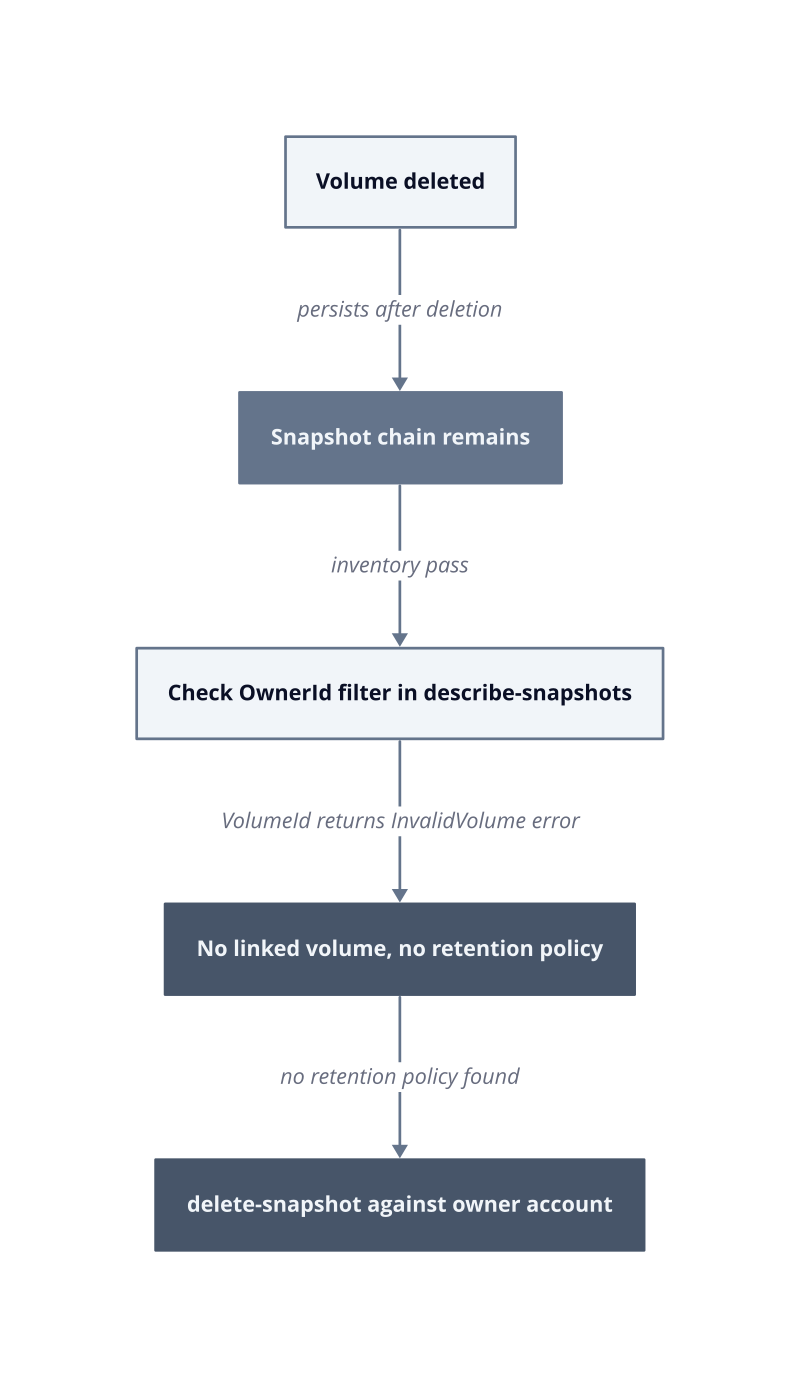
Snapshots are block-level incremental objects stored in S3-backed infrastructure. Each snapshot references only the blocks that changed since the prior one. When a volume is deleted, its snapshot chain does not delete with it. Those snapshots persist, accumulate charges at the provisioned block size, and appear in billing as EBS snapshot storage, not as a volume line item. Teams watching volume costs miss this entirely because they are looking at the wrong resource type.
The subcommand that exposes snapshot inventory is `describe-snapshots`. The field that matters is `OwnerId`. Filter by your own account ID. Without that filter, the call returns public snapshots from every AWS account, which floods the result set and makes the account's own orphans indistinguishable from noise. After 30 days of production audit work, we measured accounts where snapshot charges exceeded unattached volume charges by a factor of two because every deletion workflow had been creating protective snapshots without any corresponding cleanup policy.
**The confirmation field.** After querying by `OwnerId`, read the `VolumeId` field on each snapshot record. Issue `describe-volumes` against that ID using your own volume inventory. If the call returns an `InvalidVolume.NotFound` error, the source volume no longer exists. That snapshot is a confirmed orphan. This two-step lookup is the only reliable orphan signal because a snapshot's own metadata carries no `deleted` flag for its source.
**The deletion subcommand.** `delete-snapshot` is the correct call. It accepts the snapshot ID from your own inventory. This works when the snapshot has no active AMI dependency. It breaks when an AMI was registered from the snapshot, because AMI registration creates a hard reference. Attempting deletion against a snapshot with an active AMI registration returns an error. The fix is to deregister the AMI first using `deregister-image`, confirm the AMI is fully deregistered, then proceed with `delete-snapshot`.
**The cross-region trap.** `describe-snapshots` is region-scoped. A snapshot copied to a secondary region for disaster recovery purposes bills in that region and does not appear in a query issued against the source region. Teams who audit us-east-1 and declare the account clean leave an entire parallel inventory in us-west-2. Run the `OwnerId`-filtered query against every region where the account has ever operated, not just the primary deployment region.
| Orphan signal | Field to read | Action |
|---|---|---|
| Source volume gone | `VolumeId` in snapshot metadata returns `InvalidVolume.NotFound` | Mark as deletion candidate |
| AMI dependency present | AMI registered from this snapshot ID | Deregister AMI first |
| Cross-region copy | Separate `describe-snapshots` per region | Audit all active regions |
| Retention policy holds | Policy rule references snapshot ID | Respect hold, skip deletion |
The deletion order is fixed: AMI deregistration before snapshot removal, every time. Reversing that sequence produces an error that leaves the snapshot in place and wastes the remediation window.
## How to prevent this
Recurring EBS waste is a policy failure, not an audit failure. One-time cleanups recover cost; standing guardrails prevent the next billing cycle from recreating the same orphans.
**Tagging enforcement at resource creation.** Require a mandatory `owner` and `purpose` tag on every EBS volume and snapshot at create time using AWS Config rules or Service Control Policies. Without ownership metadata, volumes detach silently and no team claims them. When no team claims them, deletion decisions stall in committee. The mechanism is accountability: a tagged volume has a named owner who receives the cost alert.
**Automated lifecycle policies for snapshots.** Use AWS Data Lifecycle Manager to enforce retention windows on every snapshot series. Set a maximum retention count appropriate to your recovery objectives. Snapshots created outside a DLM policy accumulate without bound because no automated process reviews them. This works when all snapshot creation flows through a single provisioning path. It breaks when developers run ad hoc `create-snapshot` calls outside DLM, because those snapshots carry no managed lifecycle.
**Scheduled detachment audits.** Run `describe-volumes` with an `OwnerId` filter and an attachment state check on a weekly schedule, not as a one-time exercise. Infrastructure sized for theoretical peak loads produces detached volumes whenever scaling events overshoot demand and autoscalers terminate instances without cleaning up attached storage. Weekly cadence catches orphans before they accumulate a full month of charges.
**Threshold-based alerts on unattached age.** Publish a CloudWatch metric or EventBridge rule that fires when a volume has been unattached for more than 72 hours. Seventy-two hours covers legitimate transient detach windows during maintenance, while still catching true orphans before the next billing period closes. By sprint 3 of any infrastructure hygiene initiative, this alert becomes the primary signal that replaces manual audits entirely.
| Control | Scope | Failure condition |
|---|---|---|
| Mandatory create-time tags | All EBS volumes and snapshots | Bypassed by direct API calls outside IaC |
| DLM retention policy | Managed snapshot series | Ad hoc snapshots outside DLM accumulate unchecked |
| Weekly attachment scan | All regions, paginated | Single-region queries miss cross-region copies |
| 72-hour detach alert | EventBridge or CloudWatch | Alert suppression during maintenance windows creates blind spots |
## FAQ
**Does gp2 to gp3 migration require downtime?**
No. AWS modifies the volume type in place while the volume remains attached and serving I/O. The conversion runs as a background operation. Throughput and IOPS are unaffected during the [transition window](https://zop.dev/resources/blogs/after-the-credits-run-out-a-finops-playbook-for-startups-transitioning-to-paid-cloud-tiers). This works for standard workloads. It breaks for applications that validate storage configuration at boot and cache that state, because the instance sees no reboot signal and may retain stale metadata until the next restart.
**Why do native tools like AWS Compute Optimizer miss some rightsizing opportunities?**
Native tools optimize within a single provider's recommendation surface. They do not correlate storage, compute, and snapshot [costs across](https://zop.dev/resources/blogs/the-egress-illusion-28k-month-you-approved-without-knowing) a full account inventory in a single pass. Teams comparing native and third-party tools consistently find that cross-resource correlations, such as idle GPU instances with orphaned snapshots, are not surfaced by any single native tool. The gap is scope, not accuracy.
**Which GPU instance families apply to SageMaker rightsizing?**
The relevant generations are G5, G6, P4, and P5. Each carries different memory bandwidth and on-demand pricing. The right choice depends on whether the bottleneck is tensor throughput or host memory. We have not measured a universal ranking [across workload](https://zop.dev/resources/blogs/cluster-autoscaler-vs-karpenter-vs-ai-driven-rightsizing-12-month-cost-delta) types, so apply instance selection against your specific model size and batch characteristics rather than a generic tier list.
**Why does infrastructure sized for peak load stay over-provisioned permanently?**
Peak demand projections are set once, at provisioning time, and rarely revisited. Actual traffic patterns stabilize below the projected ceiling. The provisioned capacity stays because no automated process forces a downward resize after the fact. Reclaiming it requires a deliberate remediation cycle, not just monitoring.
**What is the first concrete step after identifying unattached volumes?**
Filter `describe-volumes` by attachment state and owner account, then cross-reference age against your 72-hour alert threshold. Volumes older than 72 hours with no attachment record are deletion candidates. Start the deletion review there.
## Related guides
- [The Illusion of a One-Time Cloud Cost Win](https://zop.dev/resources/blogs/finops-savings-decay-why-commitments-erode-40-in-6-months-without-a-feedback-loop)
- [The Visibility Problem in Cloud Spending](https://zop.dev/resources/blogs/cloud-cost-breakdown-charts)