# What AWS Free Tier Actually Gives You (And When It Ends)
> The AWS Free Tier is a 6-month, $200 credit window with a hard termination date, and understanding its structure determines whether you exit it with a working cost model or a surprise invoice.
Source: https://zop.dev/resources/blogs/after-the-free-credits-run-out-a-finops-playbook-for-startups-transitioning-to-paid-cloud-tiers
Published: 2026-11-13 · Author: muskan-bandta · Tags: kubernetes, aws, cloudgovernance, sre, database
---
## What AWS Free Tier Actually Gives You (And When It Ends)
The AWS Free Tier is a 6-month, $200 credit window with a hard termination date, and understanding its structure determines whether you exit it with a working cost model or a surprise invoice.
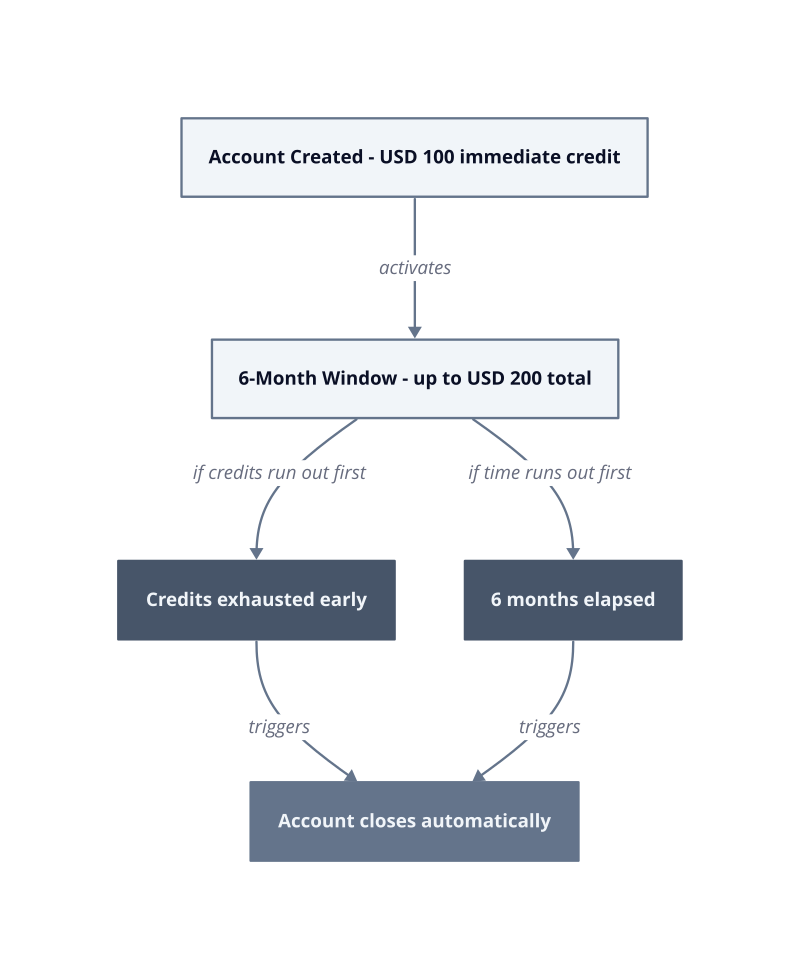
The credit mechanics are straightforward but easy to misread. New accounts receive $100 immediately upon creation, with the remaining $100 available across the full 6-month period ([AWS Free Tier](https://aws.amazon.com/free/)). The account closes automatically at 6 months or when credits are exhausted, whichever arrives first. That second condition is the one teams miss. Spin up an oversized RDS instance or leave EC2 instances running through a weekend, and you can drain the second $100 in weeks, not months.
| Metric | Value |
|---|---|
| Immediate credit at account creation | USD 100 |
| Total credits over free tier period | USD 200 |
| Account lifetime (maximum) | 6 months |
**Credit exhaustion risk.** Free tier masks real utilization because over-provisioned defaults hide actual resource consumption. The $100 immediate credit absorbs those defaults silently. By the time you notice the second $100 depleting, the spend pattern is already established and the account clock is running.
**The termination trigger.** Automatic closure on credit exhaustion means there is no grace period to export configuration, migrate data, or right-size before billing begins. Teams that treat the free tier as indefinite discover this only when an [invoice arrives](https://zop.dev/resources/blogs/the-governance-tax-what-shipping-before-you-re-ready-actually-costs-per-quarter) for a full on-demand month.
**The 30-day inflection point.** The first 30 days are the only period where you can observe actual usage before committing to any architecture. Tagging every resource at creation costs nothing and pays forward: retroactive tagging after the account converts to paid tier is operationally expensive because AWS does not backfill cost allocation data.
Set budget alerts at 50%, 90%, and 100% of your credit balance on day one. The mechanism is simple: early threshold alerts trigger behavioral changes before overage occurs, while alerts set at 90% or 100% only confirm damage already done. The specific next action is to open AWS Budgets immediately after account creation and configure all three thresholds against the $200 ceiling before you deploy a single resource.
## The Exploration Strategy: Earning Your Second $100 in Credits
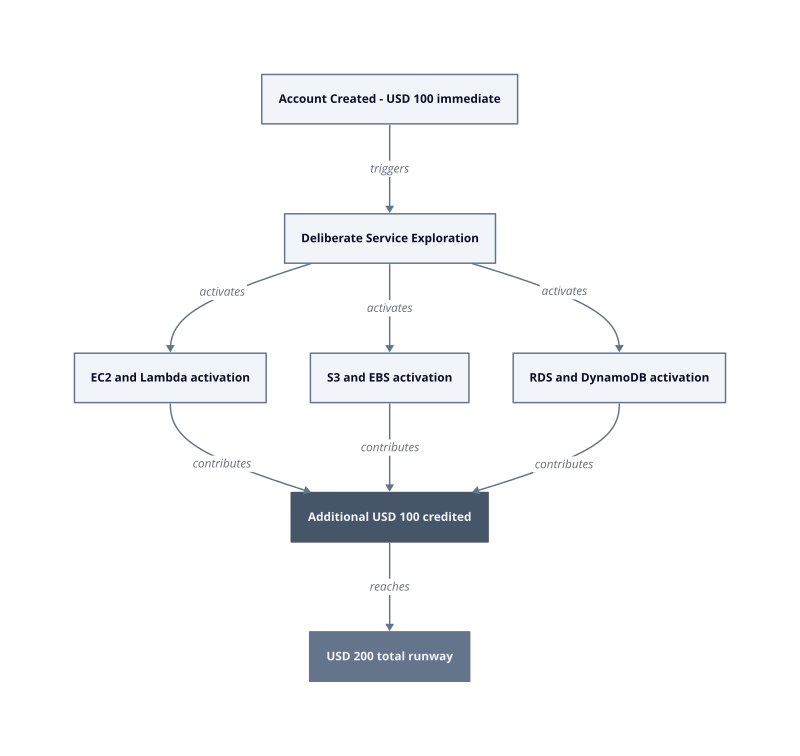
The second $100 in credits is not issued automatically. You earn it by deliberately activating specific AWS services during the free period, which signals genuine platform engagement rather than passive account holding.
The mechanism behind this design is deliberate. AWS structures the additional $100 as a behavioral incentive: accounts that explore compute, storage, database, and networking services within the free tier window demonstrate the usage patterns that predict long-term platform adoption. Passive accounts that only create an identity and stop receive only the initial grant. Active exploration is the unlock condition.
| Metric | Value |
|---|---|
| Credits at account creation | USD 100 |
| Credits unlocked through exploration | USD 100 |
| Total available credits | USD 200 |
| Maximum account lifetime | 6 months |
**Intentional activation.** Spinning up a t2.micro EC2 instance, writing a few objects to S3, and querying a small RDS instance is not busywork. Each service touch registers usage against your account profile. The exploration does not need to be production-grade. It needs to be real. Test workloads, proof-of-concept pipelines, and architecture experiments all qualify.
**The exploration window constraint.** The 6-month account lifetime from [AWS Free Tier](https://aws.amazon.com/free/) is a hard ceiling. Waiting until month 4 to explore services compresses your credit-earning runway against the same termination clock. Front-load service activation into the first 30 days. Exploration completed early preserves the full remaining window for evaluating [actual workload](https://zop.dev/resources/blogs/cloud-rightsizing-without-breaking-production-gp2-to-gp3-ec2-cpu-baselines-and-g) costs against the earned balance.
**The passive account trap.** Accounts that only provision IAM users and configure billing alerts without touching compute or storage services run a real risk of never unlocking the second grant. The fix is a structured activation checklist executed in the first deployment week, not an ad hoc walkthrough whenever it feels convenient.
**Credit preservation during exploration.** Exploration-driven credit earning only pays off if the services you activate are shut down or right-sized immediately after the activation event. A t3.small instance left running to satisfy an exploration criterion adds incremental on-demand cost each month, so resources that serve no active workload should be stopped immediately. Multiply that across three or four forgotten resources and the earned USD 100 disappears before you deploy anything meaningful.
The specific next action is to build a written activation checklist before touching the console: list which services you will touch, the minimum resource sizes required, and the shutdown condition for each. Execute it in a single session within the first week. This converts the exploration requirement from a vague incentive into a controlled, time-boxed event with a defined end state.
## Setting Up Cost Controls Before You Spend a Dollar
Budget alerts cost nothing to configure and prevent the most predictable failure mode in cloud adoption: discovering overage after the billing cycle closes.
Google Cloud Billing Budgets illustrates the default threshold structure precisely. The platform sets alerts at 50%, 90%, and 100% of the budget amount by default ([Google Cloud Billing Budgets](https://cloud.google.com/billing/docs/how-to/budgets)). That 90% default is too late. By the time 90% of a budget is consumed, the behavioral window for course correction is closed. Resizing instances, killing idle jobs, or pausing non-critical workloads all require lead time. A 50% alert gives you that time.
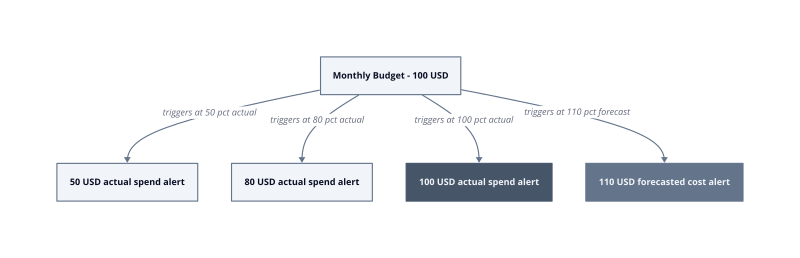
The mechanism behind threshold placement is straightforward. A 50% actual spend alert on a $100 budget fires when accrued cost crosses $50, which leaves $50 of runway to investigate and act. A 90% alert on the same budget leaves $10. That $10 disappears in hours on any compute-intensive workload.
| Alert Type | Threshold | Remaining Budget When Triggered |
|---|---|---|
| Actual spend | 50% | USD 50 |
| Actual spend | 80% | USD 20 |
| Actual spend | 100% | USD 0 |
| Forecasted cost | 110% | Negative USD 10 projected |
The 110% forecasted cost alert is a separate instrument. It fires when projected spend exceeds $110 on a $100 budget before the billing period ends, giving you a forward warning rather than a trailing one. One constraint applies specifically here: budgets configured for a custom time range cannot trigger forecasted cost alerts. If you define a budget against an arbitrary date window rather than a standard monthly cycle, the forecast signal is unavailable. Use calendar-month budgets to preserve forecast alerting.
**Tagging policy before first deployment.** A resource tag is a metadata label attached at creation that associates spend with a team, service, or environment. Implement a mandatory tagging policy before any resource goes live. Retroactive tagging is operationally expensive because cost allocation data is not backfilled. A resource that ran untagged for a prolonged period leaves that entire span of spend in an unattributed bucket, which makes every cost conversation an argument about ownership rather than a remediation decision.
**Threshold sequencing as behavioral guardrail.** Set the 50% alert to trigger a spend review meeting. Set the 90% alert to trigger a mandatory rightsizing check. Set the 100% alert to trigger a freeze on non-essential resource creation. Each threshold maps to a specific action, not a notification that gets acknowledged and ignored. The fix is a written runbook, completed before the billing period opens, that assigns each threshold to a named owner with a defined response.
**Forecasted alerts as early-cycle signals.** Forecasted alerts project current burn rate forward against the remaining budget period. This catches acceleration events, such as a misconfigured autoscaling group spawning excess instances, before actual spend confirms the damage. The forecast signal works because cloud billing APIs update spend data throughout the day, giving the forecasting model fresh input to detect rate changes within hours.
After 30 days of data under this alert structure, you will have enough spend history to identify which services drove each threshold crossing. That history is the input for your first rightsizing review and, later, your reserved instance commitment. Without it, any commitment decision is a guess.
## Right-Sizing Instances: Why Free Tier Hides Your Real Costs
Free tier defaults provision resources for breadth of exploration, not production efficiency, and that mismatch is exactly what inflates your first paid bill.
The mechanism is structural. AWS Free Tier instances arrive pre-configured at sizes that demonstrate service capability rather than match workload demand. A t2.micro running a web server during free tier consumes 1 vCPU and 1 GiB of memory. When you graduate to paid tier and replicate that configuration at scale, you inherit the over-provisioning assumption without questioning it. Utilization data collected during free tier is unreliable for sizing decisions because the workload itself is exploratory, not production-representative.
The 30-day window after paid tier activation is the correction period. Teams that right-size instances within the first 30 days of paid tier see 20-40% cost reductions because free tier masks actual utilization patterns with over-provisioned defaults. After 30 days of paid traffic, CPU and memory utilization metrics reflect real request volumes, background job cadences, and connection pool behavior. Before 30 days, you are extrapolating from synthetic load.
Right-sizing before committing to reserved pricing matters because reservations lock you into a specific instance family and size. Teams that adopt reserved instances or savings plans after 3 months of on-demand usage see 30-60% savings because they have enough utilization data to commit confidently. The reservation discount becomes worthless if traffic growth forces a migration to a larger family.
**The utilization baseline problem.** Kubernetes resource requests are the CPU and memory values that the scheduler uses to place pods onto nodes, and they set the floor for what a node must provision regardless of actual load. Free tier workloads rarely stress these limits. The result is a baseline that undercounts real peak demand, so the right-sizing exercise on day 30 must account for growth headroom, not just observed average utilization.
**The commitment timing constraint.** Reserving compute before 3 months of paid utilization data produces a commitment based on free-tier behavior. Free-tier traffic volumes do not predict production traffic volumes. The fix is a hard rule: no reserved instance purchases until the third billing cycle closes, full stop. This works when growth trajectories are predictable by month 3. It breaks when usage spikes within the first 30 days because on-demand pricing absorbs those spikes at full rate.
**The idle instance tax.** A single m5.xlarge left running at on-demand pricing accumulates substantial cost each month, and any usage beyond a committed amount is charged at regular On Demand rates ([AWS Savings Plans Pricing and Commitment Options](https://aws.amazon.com/savingsplans/pricing/)). Free tier masks idle instances because credits absorb the cost silently. Paid tier exposes them immediately. Instance utilization reviews on day 30 routinely surface two or three instances running below 10% CPU that survived the free-to-paid transition unchecked.
| Metric | Value |
|---|---|
| Right-sizing savings window | 30 days post paid-tier activation |
| [Cost reduction](https://zop.dev/resources/blogs/why-cloud-cost-dashboards-don-t-reduce-cloud-bills) from early right-sizing | 20-40% |
| Savings plan savings after 3-month baseline | 30-60% |
The specific next action is to export AWS Cost Explorer instance utilization metrics on day 30 of paid tier, sort by average CPU below 20%, and downsize or terminate before cutting any reservation purchase order.
## Graduating to Reserved Pricing: When and How to Commit
Committing to reserved pricing before 90 days of on-demand data is the single most common cause of wasted reservation spend among early-stage cloud teams.
The mechanism is data dependency. A Savings Plan requires a commitment to a consistent dollar-per-hour usage amount for a 1 or 3 year term ([AWS Savings Plans Pricing](https://aws.amazon.com/savingsplans/pricing/)). That committed rate is priced against your baseline, and if your baseline is immature, you either under-commit and leave savings on the table, or over-commit and pay the committed rate for capacity you stop using. Any usage beyond the committed amount is charged at regular on-demand rates, so an over-commitment buys you nothing on the excess.
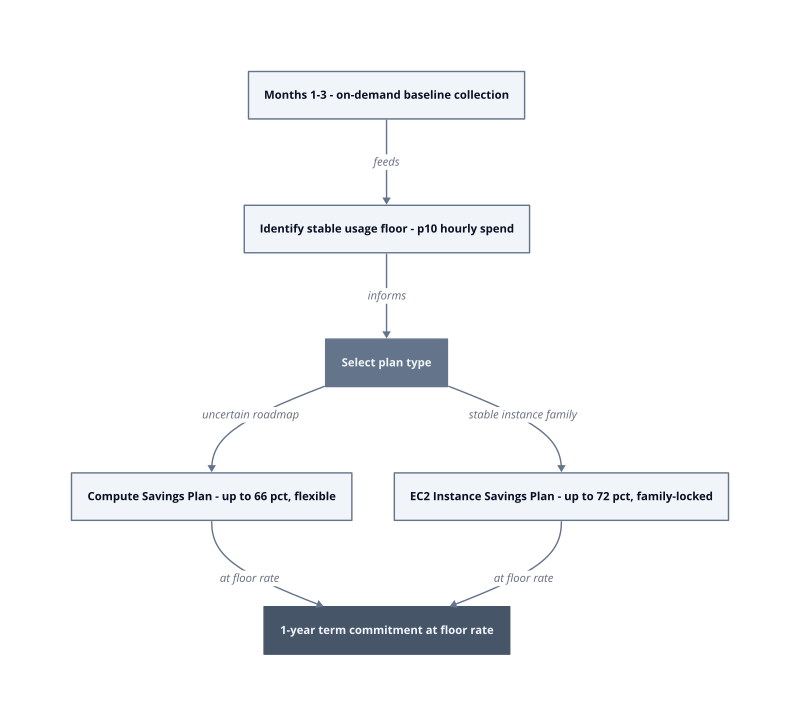
Three months of on-demand data produces a stable floor. After 90 days, hourly usage graphs show weekly seasonality, end-of-month batch spikes, and the difference between peak and trough. Those patterns define a safe commitment ceiling. Teams that adopt reserved instances or savings plans after 3 months of on-demand usage see 30-60% savings because they have enough utilization data to commit confidently. The 30-60% range spans plan type: EC2 Instance Savings Plans offer up to 72% in exchange for locking to a specific instance family in a specific Region, while Compute Savings Plans offer up to 66% with flexibility across EC2, Fargate, and Lambda, regardless of instance family, size, Availability Zone, Region, OS, or tenancy.
The [choice between](https://zop.dev/resources/blogs/opa-vs-cedar-when-policy-as-code-hits-500-accounts) those two plan types is a flexibility trade-off, not a pure savings maximization problem.
**Commit to the floor, not the average.** The safe commitment rate is the 10th percentile of your hourly spend across 90 days, not the average. Committing to the average means that in any hour below average, you are paying for capacity you did not use. The floor rate is the amount you will consume in nearly every hour of the commitment term. This works when usage trends upward over the commitment period. It breaks when a product pivot reduces compute demand mid-term, because the committed rate continues billing regardless.
**Plan flexibility versus discount depth.** EC2 Instance Savings Plans lock you to an instance family in a specific Region, which is the mechanism that produces the deeper discount. Compute Savings Plans apply across EC2, Fargate, and Lambda with no family, size, AZ, or Region constraints. If your team has a confirmed multi-year infrastructure roadmap anchored to a specific instance family, the EC2 plan captures an additional 6 percentage points of savings.
**Term length and the 1-year default.** A 3-year commitment deepens the discount further, but it extends the exposure window. For a team 90 days into paid tier, a 1-year term is the appropriate starting point. By surviving a full seasonal cycle, you can evaluate the 3-year term against demonstrated usage stability, since Savings Plans require a commitment to a consistent amount of usage measured in dollars per hour for a 1 or 3 year term.
| Metric | Value |
|---|---|
| Data collection period before commit | 90 days |
| Compute Savings Plan max discount | 66% |
| EC2 Instance Savings Plan max discount | 72% |
| On-demand rate applied to usage above commitment | 100% |
By sprint 3 of your reserved pricing rollout, run the AWS Cost Explorer Savings Plans recommendations report against the 90-day lookback window, set the commitment target to 100% of the recommended floor amount, and purchase the 1-year Compute Savings Plan first. Add the EC2 Instance Savings Plan only after confirming the instance family will not change inside the commitment window.